


Unauthorized Access: How to Detect and Prevent Security Breaches
Unauthorized access happens when someone gains entry to your systems, networks, or data without permission. These cybersecurity breaches drain resources, expose sensitive information, and can cost your business millions in damages and lost customer trust.
This guide explains what unauthorized access is, how attackers exploit vulnerabilities to break into systems, and what proven strategies exist to detect and prevent these attacks before they damage your business.
Key takeaways
- The FBI reported $16.6 billion in cybercrime losses in 2024, with phishing, extortion, and data breaches as the top three threats leading to unauthorized access incidents(1).
- Unauthorized access costs extend beyond financial losses to include operational disruption, damaged reputation, regulatory penalties, and customer trust erosion that can take years to repair.
- Most unauthorized access stems from weak authentication, compromised credentials, or human error rather than sophisticated hacking techniques.
- Multi-layered security combining strong authentication, continuous monitoring, and employee training creates the best protection against unauthorized access attempts.
What is unauthorized access?
Unauthorized access happens when individuals gain entry to your organization’s systems, networks, applications, data, or devices without permission. This breach bypasses your cybersecurity controls and authentication mechanisms, allowing hackers to steal information, manipulate data, or cause operational damage.
These attacks exploit weak passwords, phishing schemes, software vulnerabilities, or insider threats. Once inside your systems, hackers can access customer data, financial records, intellectual property, or any other information stored on your network.
The scale of unauthorized access attacks is massive. In 2024, the FBI’s Internet Crime Complaint Center received 859,532 cybercrime complaints with reported losses exceeding $16.6 billion, representing a 33% increase from 2023(1). The average loss per incident was $19,372(2). Data breaches ranked as the third most common cybercrime type, with 64,882 reported cases(2).
How does unauthorized access happen?
Weak or compromised credentials
Password-related vulnerabilities remain the leading cause of unauthorized access. Users select weak passwords, reuse credentials across multiple services, or fall victim to credential theft. Research analyzing password data from 2024-2025 breaches found that only 6% of passwords are completely unique(6).
Attackers obtain credentials through data breaches, phishing attacks, or dark web purchases. Once they have valid login information, they can gain access to systems without triggering many security alerts.
Phishing and social engineering
Phishing was the most reported cybercrime type in 2024, with 193,407 complaints filed to the FBI(2). Attackers send deceptive emails or messages that trick recipients into revealing login credentials, clicking malicious links, or downloading malware.
These attacks exploit human psychology rather than technical vulnerabilities. By impersonating trusted entities like colleagues, vendors, or executives, attackers manipulate victims into granting unauthorized access.
Exploiting software vulnerabilities
Unpatched software creates entry points for attackers. Security flaws in operating systems, applications, or network devices allow attackers to bypass authentication controls and gain unauthorized system access.
Attackers actively scan for known vulnerabilities and exploit them before organizations can apply security patches. Zero-day vulnerabilities, which are flaws unknown to software vendors, are particularly dangerous because no patches yet exist when attackers discover them.
Insider threats
Not all unauthorized access comes from external attackers. Insiders with legitimate system access can misuse their privileges to steal or manipulate data beyond their authorization level. Insider threats include malicious employees seeking revenge or financial gain, as well as unintentional breaches caused by negligence or lack of security awareness.
Broken authentication mechanisms
Misconfigured or poorly implemented authentication systems create opportunities for unauthorized access. Systems that don’t limit login attempts allow brute force attacks where attackers try multiple password combinations until they succeed.
Missing session timeouts, weak password recovery processes, and inadequate verification steps all weaken authentication and make unauthorized access easier.
Third-party and supply chain compromises
Attackers increasingly target third-party vendors and suppliers with weaker security controls as a way to access larger organizations. Once attackers compromise a vendor with access to your systems, they can use those connections to gain unauthorized network access.
The cost of unauthorized access to your business
Direct financial losses
Unauthorized access creates immediate financial damage. The global average data breach cost was $4.44 million in 2025, though costs vary significantly by industry and region(4). United States organizations faced the highest average breach costs at $10.22 million(4).
These costs include incident response, forensic investigation, legal fees, regulatory fines, customer notification, and credit monitoring services for affected individuals.
Operational disruption
Unauthorized access incidents force organizations to shut down systems, restrict access, and divert staff to incident response. Consider that the average time to identify and contain a breach was 241 days in 2025(4). During this period, attackers may have ongoing access to your systems, worsening the damage.
Regulatory and compliance penalties
Data protection regulations like GDPR, HIPAA, and CCPA impose strict requirements for safeguarding personal information. Unauthorized access that exposes protected data triggers mandatory breach notifications and can result in substantial regulatory fines.
Customer trust and reputation damage
Customers expect businesses to protect their personal information. Unauthorized access incidents that expose customer data erode trust and damage your reputation. According to Experian’s 2025 Identity and Fraud Report, less than half of consumers highly trust companies to address their online security concerns(5).
Customer churn accelerates after breach announcements as users move to competitors they perceive as more secure. Rebuilding trust requires significant time and resources.
Intellectual property theft
Unauthorized access to proprietary information, trade secrets, or research data can eliminate competitive advantages built over years. Competitors or nation-state actors who steal intellectual property gain capabilities without the investment in development.
Legal liability
Organizations may face lawsuits from customers, partners, or shareholders affected by unauthorized access incidents. Class action lawsuits following major breaches can cost tens or hundreds of millions in settlements and legal defense.
Warning signs of unauthorized access
Unusual login patterns: Failed login attempts from unfamiliar locations or at odd hours signal potential unauthorized access attempts. Multiple failed logins followed by a successful login suggest brute force attacks or credential stuffing.
Unexpected account activity: Accounts accessing data or systems outside normal usage patterns require investigation. Watch for users accessing resources they don’t typically need, downloading unusually large amounts of data, or making configuration changes outside their role.
System performance anomalies: Unauthorized access often creates detectable system changes. Slow network performance, unexpected system crashes, or unusual CPU and memory usage can indicate malicious activity running on your systems.
Unfamiliar processes or applications: Unknown programs running on servers or workstations may be malware installed through unauthorized access. Regular system audits help identify unauthorized software.
Changes to user accounts or permissions: New user accounts appearing without proper authorization, privilege escalations without approval, or changes to security group memberships all suggest unauthorized access to administrative functions.
Unusual data access or transfers: Large file transfers, especially to external locations or during off-hours, may indicate data exfiltration following unauthorized access. Database queries accessing more records than typical also warrant investigation.
How to prevent unauthorized access
Implement strong authentication controls
Enforce password policies requiring complex credentials with minimum length and special characters. Better yet, adopt passwordless authentication using biometrics, hardware tokens, or certificate-based authentication that eliminates password vulnerabilities entirely.
Deploy multi-factor authentication (MFA) across all systems, especially for administrative access and remote connections. MFA requires users to provide multiple verification factors, making unauthorized access significantly harder even when cybercriminals steal passwords.
Monitor and analyze user behavior
Implement user behavior analytics that establish baseline activity patterns for each account. These systems detect anomalies indicating potential unauthorized access, such as unusual login times, unfamiliar device usage, or atypical data access patterns.
Behavioral monitoring identifies compromised credentials even when cybercriminals use valid login information because their behavior differs from legitimate users.
Apply the principle of least privilege
Grant users only the minimum access rights necessary for their job functions. Regularly review and revoke unnecessary permissions. This limits damage from both external attacks and insider threats by restricting what compromised accounts can access. Segment your network to prevent lateral movement if attackers gain initial access to one system.
Maintain comprehensive audit logs
Enable detailed logging of authentication attempts, system access, data queries, and configuration changes. Retain logs for sufficient periods to support investigation and compliance requirements.
Centralize log collection and implement automated analysis to detect suspicious patterns indicating unauthorized access attempts.
Keep systems patched and updated
Regularly update operating systems, applications, firmware, and security tools to eliminate known vulnerabilities that attackers exploit. Establish patch management processes that prioritize critical security updates and apply them promptly.
Subscribe to security bulletins from software vendors to stay informed about newly discovered vulnerabilities requiring your attention.
Deploy advanced threat detection
Implement security solutions that use AI and machine learning to identify sophisticated unauthorized access attempts. These systems analyze vast amounts of data to detect patterns humans might miss and adapt to new attack methods automatically.
Secure remote access
Remote work creates additional unauthorized access risks. Require VPN connections for remote system access, implement strong authentication for VPN access, and monitor remote connections for suspicious activity.
Consider implementing zero-trust network architecture that treats every access request as potentially unauthorized until verified, regardless of source.
Conduct security awareness training
Train employees to recognize phishing attempts, use strong passwords, report suspicious activity, and follow security best practices. Human error contributes to many unauthorized access incidents, making user education a critical defense layer. Regular training helps your employees stay aware of evolving attack techniques.
Perform regular security assessments
Conduct penetration testing to identify vulnerabilities attackers could exploit for unauthorized access. Review access controls, authentication mechanisms, and security configurations to ensure proper implementation. Third-party security audits provide objective assessments of your security posture and recommendations for improvement.
Manage third-party access
Carefully control vendor and contractor access to your systems. Require vendors to meet your security standards, limit their access to only necessary systems and data, monitor third-party activity, and regularly review and revoke vendor access when no longer needed.
Implement session management controls
Configure systems to automatically terminate inactive sessions, require re-authentication for sensitive operations, and detect and block session hijacking attempts. Proper session management prevents attackers from exploiting abandoned or stolen sessions for unauthorized access.
Prevent unauthorized access with DataDome
DataDome Account Protect uses real-time behavioral analysis and machine learning to detect and block unauthorized access attempts across your digital properties. The solution analyzes hundreds of signals including device fingerprints, behavioral patterns, IP reputation, access velocity, and session characteristics.
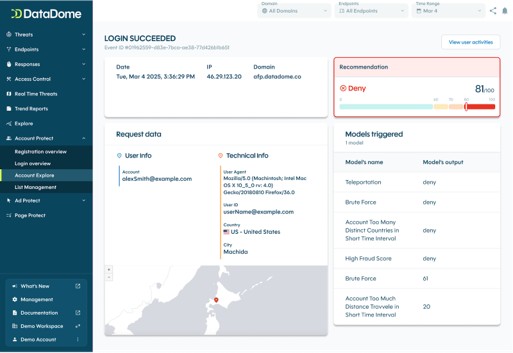
DataDome identifies suspicious activity indicating unauthorized access attempts, including credential stuffing attacks, automated bot traffic, and anomalous user behavior. The system responds automatically by blocking obvious threats, presenting challenges to suspicious requests, or allowing legitimate users through without friction.
The solution deploys in minutes and provides comprehensive protection against both automated attacks and sophisticated human-led unauthorized access attempts. DataDome helps prevent account takeover, fake account creation, and other security threats stemming from unauthorized access.
Datadome was selected “Most Innovative Account Takeover Protection” by cyberdefenseawards.com

Learn how DataDome Account Protect strengthens your defenses against unauthorized access attempts and protects your business from costly security breaches.
FAQ
Unauthorized access is when someone gains entry to systems or data without permission. A data breach is the result when unauthorized access leads to data theft, exposure, or compromise. Every data breach involves unauthorized access, but not every unauthorized access attempt results in a breach if detected and stopped quickly.
Yes. Attackers may gain unauthorized access to disrupt operations, install malware, modify configurations, or establish future access pathways without immediately stealing data. System sabotage, ransomware deployment, and reconnaissance for larger attacks all involve unauthorized access that may not include data theft.
Attack speed varies significantly. Automated brute force attacks can attempt thousands of login combinations per minute. Phishing attacks can grant immediate access when users provide credentials. Exploiting software vulnerabilities can provide access in seconds or minutes once attackers identify the flaw.
MFA significantly reduces unauthorized access risk but isn’t foolproof. Sophisticated attackers can bypass MFA through session hijacking, SIM swapping, or malware that intercepts authentication codes. However, MFA remains one of the most effective security controls and stops the vast majority of credential-based attacks.
Immediately isolate affected systems to prevent further damage or lateral movement. Change credentials for compromised accounts, document all evidence for investigation, notify your security team or incident response provider, and assess what data or systems the attacker accessed. Follow your incident response plan and consider engaging external forensic experts for sophisticated attacks.
Monitor for unusual account activity, failed login attempts, or access from unfamiliar locations. Many breach notification services alert you when your credentials appear in data breaches. Enable login notifications for important accounts so you’re alerted to access attempts. If you suspect a compromise, change your password immediately and enable MFA.
References
- https://www.fbi.gov/news/press-releases/fbi-releases-annual-internet-crime-report
- https://www.ic3.gov/AnnualReport/Reports/2024_IC3Report.pdf
- https://www.statista.com/statistics/273550/data-breaches-recorded-in-the-united-states-by-number-of-breaches-and-records-exposed/
- https://www.ibm.com/reports/data-breach
- https://www.experian.com/blogs/insights/experian-2023-identity-and-fraud-report/
- https://cybernews.com/security/password-leak-study-unveils-2025-trends-reused-and-lazy/

Related posts
How Kiabi Cut Malicious Login Attempts & Gained Instant Threat Visibility
Tell me more

What Is Account Takeover Fraud? Attacks, Signs, & Prevention
Tell me more

Account Protect Updates: Clearer Visibility, Stronger Signals, & More Control
Tell me more

Account Takeover Prevention: How to Prevent ATO & Mitigate Fraud
Tell me more

