
Website performance: How to optimize website speed and avoid downtime.
If your website is slow, you’re losing money fast. But how do you make your website load faster?
In online business, milliseconds matter. As early as 10 years ago, Amazon famously found that every 100ms of latency cost them 1% in sales. Google, on their side, discovered that an extra half second’s search result generation time caused traffic to drop by 20%.
People certainly haven’t become any more patient since then. For any modern online business, website performance equals company performance. The reputational and financial consequences of less-than-stellar website load times can be brutal.
People certainly haven’t become any more patient since then. For any modern online business, website performance equals company performance. The reputational and financial consequences of less-than-stellar website load times can be brutal.
In this article, we review some of the main website performance best practices. In particular, we focus on an often overlooked website speed optimization factor: eliminating bot traffic.
Website performance best practices: How slow is too slow?
We know intuitively that faster websites perform better, but exactly how slow is “too slow”?
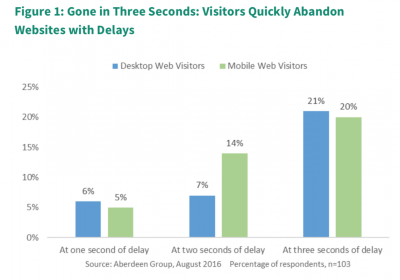
According to Aberdeen Research, three seconds appears to be the breakpoint for all web users. Compared to a one-second load time, abandonment rates triple (see figure above). After three seconds, 20 percent—one in five—of your visitors have already left your website and gone to check out a better-performing competitor instead.
Kissmetrics found even more dramatic numbers. According to their figures, 40% of consumers abandon a website that takes more than 3 seconds to load. If that’s your case, it’s a good thing you’re here: it’s definitely time to take action to make your website load faster.
But that’s not all: Kissmetrics also found that just a 1-second delay in page response can result in a 7% reduction in conversions. For an e-commerce site generating $100,000 per day, this percentage translates to $2.5 million in lost sales per year. That’s a pretty expensive second.
Of course, these losses will be multiplied if your website slows to the point of going down. If you are a pure-play e-commerce business, website downtime means a 100% revenue loss during the outage.
To calculate how much recurring downtime on your website might cost you, divide your total annual online revenue by the number of minutes in a year (525,600) and multiply by the number of downtime minutes:
Downtime loss ($) = Annual revenue/525,600 X downtime minutes
And this calculation only takes into account the direct loss of sales. The time your teams spend fixing the issue, the damage to your brand perception and your search engine rankings, and other indirect costs will drive the number further up.
Mobile makes website speed optimization even more important.
Mobile users are even more impatient than desktop users. As e-commerce continues its shift to mobile, website speed optimization becomes more important than ever.
According to Google, as much as 53% of mobile site visitors leave a page that takes longer than three seconds to load. If your pages are even slower than that, the consequences are chilling.
Poor mobile website performance kills your traffic beyond just bounces, too: it hurts your SEO. Google has officially announced that starting in July 2018, page speed will be a ranking factor for mobile searches.
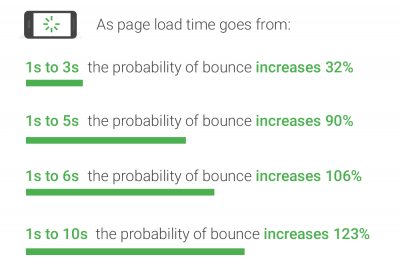
Source: think with Google
To drive home the point, Google has introduced a nifty mobile revenue impact calculator. You can enter a few key online business metrics such as average order value and conversion rate, and watch the potential annual revenue impact from improving speed and website performance on a sliding scale.
How much more could you have made this week with a one-second improvement?
How to improve website performance:
Enough scare stories, you probably got the point. The question now is: what can you do to fix poor website performance and boost your business?
Your choice of web hosting provider, and which hosting plan you sign up for, can have a significant impact on your website performance. Testing a hosting provider’s performance is a tricky task, but generally speaking, price = performance in this domain. Specialized test sites like Host Tracker and Toast.net can give you an indication, but true performance will depend on factors like your location and your traffic pattern.
If you aren’t already using a content distribution network (CDN), consider implementing one to distribute the load of delivering your content. In essence, the CDN will store copies of your website at multiple data centers at different geographic locations. Users access your content from the location closest to them, which means faster and more reliable delivery.
There is also a range of on-site measures you can implement to improve your website performance. Site speed assessment tools such as Pingdom and Google PageSpeed Insights will provide a list of suggestions. Typical recommendations include:
- Leveraging browser caching.
- Optimizing JavaScript.
- Optimizing image sizes.
All these website performance best practices will help optimize your website speed and make your pages load faster. However, your efforts could be for naught if you don’t also address another important, but often underestimated factor: Large volumes of invisible traffic.
How bot traffic impacts website performance:
Bots (automated programs) now represent more than half of the world’s total website traffic. But because much of this traffic goes undetected by standard analytics tools, site owners are often unaware of the true volume of bot traffic to their website.
When they first implemented a bot protection solution, the IT team at Rakuten France (the country’s second most visited e-commerce website) was astonished to discover that a whopping 75% of their total traffic was generated by bots.
Bots tie up valuable CPU resources just like any other visitor, often causing significant load time increases. When they come to a website in particularly large numbers, they can even cause website downtime—intentionally or unintentionally.
Unwanted bot traffic causes a poorer website performance and user experience for your human visitors, with the obvious consequences for your bounce rates, conversion rates and revenue.
More visitors also means you need (and pay for) more servers, increasing the risk of server-overload, even when the visitors you’re serving aren’t human and will never buy from you. Bot traffic, therefore, doubly hurts your business: by decreasing revenue and by increasing cost.
The Topps Company creates and markets physical and digital sports cards, entertainment cards and collectibles, and confectionery. During launches of coveted limited-edition products, scalper bots were causing significant slowdowns and checkout problems for regular users. The situation came to a crux during the Coronavirus pandemic, which drove both existing and new shoppers online.
“It was a perfect storm,” recalls Sayed Gaffar, Director of E-commerce, EMEA and international markets at The Topps. “We had more people than ever wanting to buy our products, but because of all the nefarious activity, they sometimes weren’t able to. People were looking forward to our launches and to purchasing something, but the malicious actors ruined the experience for them.”
How to speed up your website by managing bot traffic:
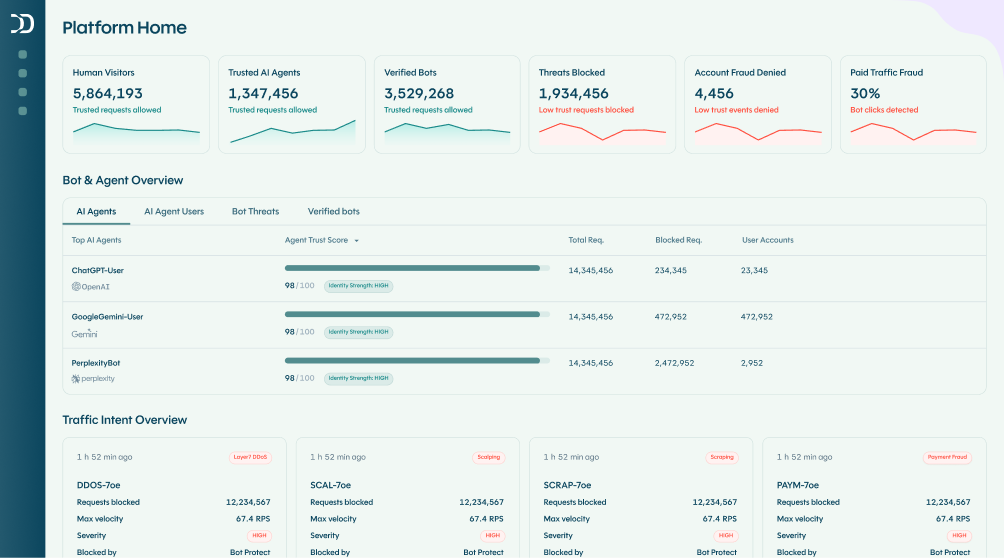
DataDome is a SaaS bot protection solution which blocks unwanted bot traffic from your websites, mobile apps and APIs. It detects all your automated traffic in real time. Bad bots are blocked by default. For most e-commerce websites, this alone reduces the total traffic volume by at least 30-40 percent.
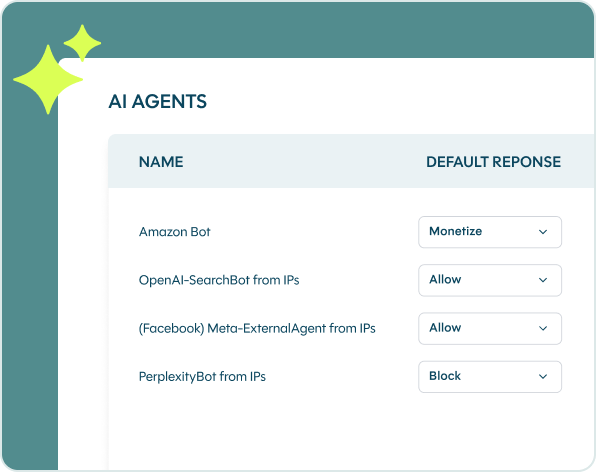
For special occasions such as Black Friday, you can further optimize website speed by limiting access for all types of bots. For example, you can use custom rules to temporarily block bots from tier 2 search engines, or apply rate limiting to ensure that your technical partners and other friendly bots don’t consume more bandwidth than you’re ready to allocate to them.
Rue du Commerce is one of the pioneers of e-commerce in France. Despite its robust and secure infrastructure, the IT team was regularly called upon to deal with ongoing attacks to avoid website downtime due to aggressive bot traffic.
“User experience is extremely important to us. As a generalist marketplace, it’s hard to differentiate ourselves through our products. But we can be the best from a technical standpoint,” says Jean-Michel Colas, CIO at Rue du Commerce.
His team decided to implement the DataDome bot protection solution. As soon as the protection was activated, the website’s bandwidth consumption dropped by 30-40%, freeing up those resources for legitimate users. Today, Rue du Commerce is #1 on the ranking for the fastest French mobile e-commerce sites.
Conclusion
Blocking unwanted bot traffic is a fast and easy way to improve website performance. And as an added benefit, it keeps your content and online data protected from scraping, hacking and fraud.
The DataDome solution is compatible with all major web technologies, including multi-cloud and multi-CDN setups, and can be installed in minutes without any changes to the existing architecture. Once implemented, it runs on autopilot and takes care of all your automated traffic, so that you can focus on other website speed optimization efforts.
Want to see what type of bot traffic is on your site? You can test your site today. (It’s easy & free.)