What is OpenAI dots?

OpenAI dots are always-on personal AI agents in ChatGPT. OpenAI launched them on September 29, 2026, starting with Pro and Business Premium users in eligible markets. Each dot runs on GPT-6 Astra, has its own cloud computer, learns from feedback, and keeps working on a user’s goals between conversations.

A dot has its own browser too. OpenAI says a dot’s cloud computer, including its own browser, can be used for research, documents, data analysis, and software work, so a dot may visit your website while it works for a user. In DataDome’s testing, a dot also completed a purchase: it opened a secure sign-in prompt, asked for a shipping address, and waited for approval before paying. It isn’t a crawler.

OpenAI’s crawler page lists four agents:

  • OAI-SearchBot surfaces sites in ChatGPT search results.
  • OAI-AdsBot checks the landing pages of ads submitted on ChatGPT.
  • GPTBot crawls content that may be used to train OpenAI’s models.
  • ChatGPT-User visits pages for certain user actions in ChatGPT and Custom GPTs.

Dots isn’t on that list. OpenAI also publishes IP address files for those four agents, but not for dots, and it doesn’t document a user-agent or robots.txt token for dots.

Threat research insights on Dots

All data in this section are produced by DataDome's Galileo Threat Research team from our proprietary detection network and reviewed by human analysts.

Verified Bot A verified bot has high identification strength
Verified
Robots.txt Compliance Whether this bot respects robots.txt directives
Unconfirmed
Identification Strength How confidently DataDome can identify this bot
High

Traffic origins

Top 15 countries by bot traffic

US US 63.12%
JP JP 6.74%
CA CA 5.6%
AU AU 2.77%
GB GB 2.49%
TH TH 2.36%
ES ES 2.34%
KR KR 1.89%
BR BR 1.23%
MX MX 1.1%
FR FR 1.08%
SG SG 0.98%
TW TW 0.94%
CO CO 0.81%
AR AR 0.56%

Most used autonomous system (AS)

Top 5 by traffic share

Cloudflare, Inc.
100.0%
Microsoft Corporation
0.0%
Fastly, Inc.
0.0%
Traffic Occupancy
0.04%

On average, occupy 0.04% of the traffic from bots in the directory

Authorization Rate
100%

Businesses decide to authorize this bot 100% of the time

Legitimate use cases

  • Research and work tasks: A dot can use its cloud browser for research, documents, data analysis, and software work on behalf of a user.
  • Shopping and checkout: in DataDome’s testing, a dot completed a purchase in its cloud browser and waited for the user’s approval before clicking Pay.
  • Signed-in sessions: When a site needs a login, the user enters credentials in a private form and completes any verification. The session can then stay available until the user signs out or the site expires it.
  • User takeover: The user can take over the dot’s mouse and keyboard in its browser, including to sign in themselves. A visit can include a person driving the session.
  • Background work: Dots keep working between conversations. OpenAI says background proactive research uses read-only tools that can’t control the browser or computer, but a user-assigned task can continue while they’re away. 

A visit tells you a user’s dot is working on something. It doesn’t tell you what the task is or who the user is.

Why is it visiting your website?

A dot visits a page because a task its user set led there. Dots work on goals over time, so a visit doesn’t need a live chat.

  • Goal-driven work: Dots keep working between conversations on goals the user sets.
  • Its own browser and sessions: A dot’s cloud browser has its own sessions and doesn’t inherit logins from the user’s personal browser.
  • Possible human control: The user can take over the browser at any point, so mixed human and agent activity is possible.
  • Not a crawler: OpenAI describes dots as personal agents and doesn’t list them among its crawlers. Its crawlers each have their own entry on its crawler page.
  • No published schedule or rate: OpenAI doesn’t document how often or how heavily a dot visits a site.

How to detect and assess OpenAI dots traffic

  1. Check OpenAI’s documentation first. Start with OpenAI’s crawler page. If dots gets an entry later, use its user-agent and IP list. Recheck the page from time to time, since OpenAI offers an RSS feed for updates.
  2. Don’t borrow other OpenAI lists. OpenAI publishes IP files for OAI-SearchBot, OAI-AdsBot, GPTBot, and ChatGPT-User. A match against one of them doesn’t verify dots.
  3. Look at behavior. Review requested paths, request rates, session length, and sign-in activity. Dots can sign in to sites with credentials the user provides, so logged-in sessions are possible. In DataDome’s testing, Dots reached forms, login, cart, and payment steps of a shopping journey.
  4. Compare against your bot signals. Check how your bot management classifies the traffic today. Treat it as an automated browser unless you have a reason to think otherwise.
  5. Expect mixed activity. A user can take over the browser, so one session may include both agent and human actions.
  6. Check robots.txt behavior in your logs. OpenAI says robots.txt rules may not apply to ChatGPT-User because a user starts the action. OpenAI doesn’t say how dots treats robots.txt, so confirm in your logs whether it requests the file.


Why the user-agent alone isn’t enough

For OpenAI’s crawlers, you can match a user-agent and check it against a published IP list. For dots, OpenAI documents neither, so there’s no official identity to match.

  • No documented identity: OpenAI’s crawler page has no user-agent, IP file, or robots.txt token for dots.
  • Other OpenAI rules don’t cover it: Rules for GPTBot, OAI-SearchBot, OAI-AdsBot, and ChatGPT-User apply to those agents. OpenAI doesn’t say they apply to dots.
  • Wrong lists: OpenAI doesn’t say dots uses the IP files for its four crawlers, so a match against them doesn’t verify dots traffic. 
  • Copied strings: A user-agent string can be copied, so a name alone never proves who sent a request.
  • Existing bot controls: OpenAI notes that some websites block cloud browsers or require further verification. Your current bot management may already treat dots traffic like any other automated browser.

Match on intent and your own policy, not on an identity OpenAI hasn’t published.

Should you allow, limit or block it?

It depends on your content policies, security needs, and how you want to treat people who use AI agents to browse for them. A dot acts for a real user, so blocking it can also block that user’s task.

There’s no documented robots.txt token for dots, so a block has to happen on your side, through your server or bot management. Without a published identity, it also means blocking by behavior rather than by name.

Consider restricting automated browser traffic when:

  • Requests fail your verification or behavior checks
  • Your content is subscription-based, licensed, or restricted for automated access
  • Paths such as account, checkout, or admin areas shouldn’t be open to agents
  • Request volume affects performance or infrastructure costs
  • Your policy doesn’t allow agent-driven access to your content

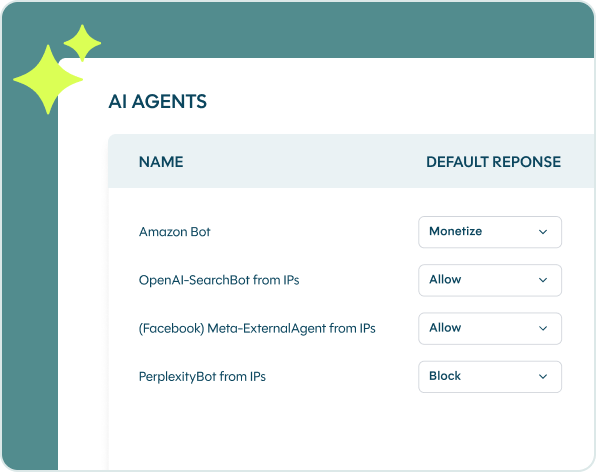
If you want agents working for your customers to reach your site, allow them and focus on protecting sensitive paths and accounts. You can also set policy by endpoint, such as allowing catalog browsing while applying intent checks on login and checkout, or allow, block, rate-limit, or monetize agent traffic outright. You can set separate preferences for OpenAI’s crawlers through their own tokens.

How to manage OpenAI dots traffic

OpenAI doesn’t document a robots.txt token for dots, so there’s no rule to add that you can count on. Robots.txt also relies on the visitor to comply, and, for ChatGPT-User, OpenAI says rules may not apply to actions a user starts. Use controls you run yourself.

  • Protect restricted resources: use authentication and authorization for private content, accounts, and checkout. Don’t count on robots.txt alone.
  • Use bot management: set policies for automated browser traffic based on behavior, not on a user-agent name.
  • Set rate limits with care: rate limiting can control excess traffic. Base thresholds on observed behavior, and don’t assume a low limit will never affect legitimate visitors.
  • Treat sign-ins like any other: Dots can sign in with credentials the user provides and a verification step the user completes. Apply your usual login protections.
  • Keep OpenAI’s crawler rules separate: use the documented tokens for OAI-SearchBot, GPTBot, and ChatGPT-User where you want them. They don’t cover dots.
  • Monitor and recheck: review server, CDN, and bot management data. Check OpenAI’s crawler page again as the product develops.

DataDome recommendation

OpenAI dots is a new personal agent that browses from its own cloud browser. OpenAI documents no user-agent, IP list, or robots.txt token for it, so there’s no official identity to check. In DataDome’s testing, Dots runs a real Chrome-based browser on a cloud virtual machine and can complete purchases.

Our recommendation is to treat dots traffic as unverified, not as malicious: let it in and let intent decide on each request, since a session can mix agent and human activity and a single check at the first request isn’t enough. You can also set policy by endpoint, or allow, block, rate-limit or monetize it outright, based on your content policy. 

This is where we can help. With DataDome Bot Protect, you can detect dots traffic and see and control it with intent-based detection. Our Agent Trust capability scores each agent in real time and keeps checking its behavior across the session. You choose which agents reach which parts of your site, and you can set different rules for agents and for OpenAI’s crawlers.

Whatever you decide, recheck OpenAI’s documentation as dots evolve, and protect sensitive paths with authentication and authorization.

DataDome

See which bots and AI agents bypass your defenses

Create your account to start analyzing and mitigating malicious bots and AI-driven threats in real-time