



Muse
What is Muse?
Muse is Meta’s personal AI agent. It carries out tasks on behalf of a person, including browsing websites, filling in forms, and checking out, all from its own cloud browser. Meta announced it on September 8, 2026, and launched it in the US on iOS, Android, and the web. It runs on Muse Spark, Meta’s model, inside Muse Secure VM, a dedicated cloud computer with its own browser. It’s free for most uses, with paid plans for more.
Muse has its own browser too. Meta says it can open that browser, fill out forms, negotiate, and check out for a person, so Muse may visit your website while it works for a user. It isn’t a crawler.
Meta’s crawler page lists five crawlers:
- FacebookExternalHit generates link previews when content is shared on Facebook, Instagram, or Messenger.
- Meta-WebIndexer improves the quality of Meta AI search results.
- Meta-ExternalAds crawls for advertising and business products.
- Meta-ExternalAgent crawls for training foundation AI models and indexing content.
- Meta-ExternalFetcher fetches individual links at a user’s request, including to support agentic AI.
Muse isn’t on that list. Meta publishes a way to check source IPs for its crawlers, but it doesn’t document a user-agent, IP list, or robots.txt token for Muse.
Legitimate use cases
- Personal tasks: Muse can send emails, book travel, fill out forms, and negotiate on behalf of a user.
- Shopping: Muse can check out with Link by Stripe, which creates a one-time-use card so the user’s real card details stay hidden.
- Signed-in sessions: Credentials a user shares go into secure storage, so Muse can use them without seeing them. Muse checks with the user before sensitive actions, such as sending an email or making a purchase.
- Background work: Muse keeps working after the user closes the app and comes back when something changes or when it needs approval.
A visit tells you a user’s Muse is working on something. It doesn’t tell you what the task is or who the user is.
Suspicious or abusive use cases
For Meta’s crawlers, you can match a user-agent and check it against Meta’s IP method. For Muse, Meta documents neither, so there’s no official identity to match.
- No documented identity: Meta’s crawler page has no user-agent, IP list, or robots.txt token for Muse. DataDome’s research also found no signed requests under Web Bot Auth.
- Other Meta rules don’t cover it: rules for the five listed crawlers apply to those crawlers. Meta doesn’t say they apply to Muse.
- Wrong lists: Meta’s crawler IP method doesn’t verify Muse traffic, since Meta doesn’t say Muse uses it.
- Copied strings: a user-agent string can be copied, so a name alone never proves who sent a request.
- Looks like an ordinary browser: in DataDome’s research, Muse’s requests are presented as a standard desktop Chrome browser on Linux, with no declared identity. They come from shared cloud and CDN infrastructure rather than consumer connections, so device and home-IP signals won’t separate Muse from other cloud-hosted traffic. DataDome identifies it from client-side browser signals instead
Match on behavior and your own policy, not on an identity Meta hasn’t published.
Why is it visiting your website?
Muse visits a page because a task its user set led there. Muse keeps working after the app is closed, so a visit doesn’t need a live chat.
- Task-driven work: Muse acts on tasks and goals the user gives it.
- Its own browser and sessions: Muse runs on a dedicated cloud computer, where the credentials for any service a person connects are stored.
- Customer-like activity: Meta says Muse’s visit appears as the user’s activity, so analytics can count it as the customer.
- Not a crawler: Meta describes Muse as a personal AI agent, not as a web crawler. Its crawlers each have their own entry on its crawler page.
- No published schedule or rate: Meta doesn’t document how often or how heavily Muse visits a site.
How to detect and authenticate Muse?
- Check Meta’s documentation first. Start with Meta’s web crawler page. If Muse gets an entry later, use its user-agent and IP guidance. Recheck the page from time to time.
- Don’t borrow other Meta lists. Meta publishes an IP check for its crawlers. A match against it doesn’t verify Muse.
- Look at behavior. Review requested paths, request rates, session length, and sign-in activity. Muse can sign in with credentials the user connects, so logged-in sessions are possible.
- Compare against your bot signals. Check how your bot management classifies the traffic today. Treat it as an automated browser unless you have a reason to think otherwise.
- Expect customer-like activity. Muse works for a real user, so sessions can look like ordinary shopping or account activity.
- Check robots.txt behavior in your logs. Meta says Meta-ExternalFetcher may bypass robots.txt because a user starts the fetch. Meta doesn’t say how Muse treats robots.txt, so confirm in your logs whether it requests the file.
Should you block it?
It depends on your content policies, security needs, and how you want to treat people who use AI agents to browse for them. Muse acts for a real user, so blocking it can also block that user’s task.
There’s no documented robots.txt token for Muse, so a block has to happen on your side, through your server or bot management. Without a published identity, it also means blocking by behavior rather than by name.
Merchants have responded differently. In September 2026, Amazon began blocking Muse from shopping on its site, citing “unauthorized AI agent” access as a violation of its Conditions of Use. On the other hand, Shopify has moved to welcome Muse traffic.
Consider restricting automated browser traffic when:
- Requests fail your verification or behavior checks
- Your content is subscription-based, licensed, or restricted for automated access
- Paths such as account, checkout, or admin areas shouldn’t be open to agents
- Request volume affects performance or infrastructure costs
- Your policy doesn’t allow agent-driven access to your content
If you want agents working for your customers to reach your site, allow them and focus on protecting sensitive paths and accounts. You can set separate preferences for Meta’s crawlers through their own tokens.
How to manage Muse?
Meta doesn’t document a robots.txt token for Muse, so there’s no rule to add that you can count on. Robots.txt also relies on the visitor to comply. Use controls you run yourself.
- Protect restricted resources: Use authentication and authorization for private content, accounts, and checkout. Don’t count on robots.txt alone.
- Use bot management: Set policies for automated browser traffic based on behavior, not on a user-agent name.
- Set rules for action surfaces: Decide what Muse can do on forms, login, account creation, cart and checkout, not only whether it can read content.
- Set rate limits with care: rate limiting can control excess traffic. Base thresholds on observed behavior, and don’t assume a low limit will never affect legitimate visitors.
- Treat sign-ins like any other: Muse can sign in with credentials the user provides. Apply your usual login protections.
- Keep Meta’s crawler rules separate: Use the documented tokens for Meta-ExternalAgent, Meta-WebIndexer, and the other listed crawlers where you want them. They don’t cover Muse.
- Monitor and recheck: Review server, CDN, and bot management data. Check Meta’s crawler page again as the product develops.
DataDome recommendation
Meta Muse is a new personal agent that browses from its own cloud browser. Meta documents no user-agent, IP list, or robots.txt token for it, so there’s no official identity to check. In DataDome’s data, it arrives as a standard desktop Chrome browser from cloud infrastructure.
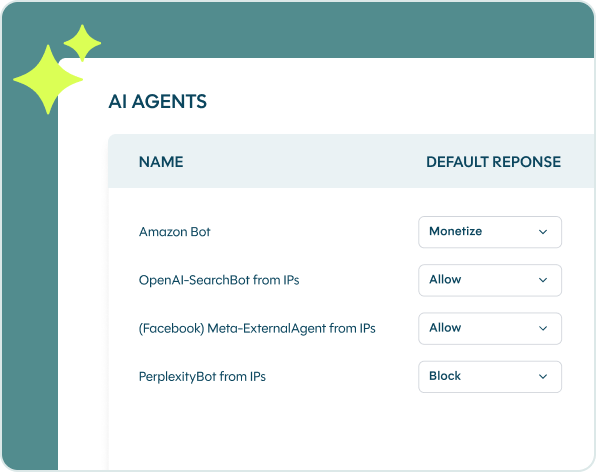
Our recommendation is to treat Muse traffic as unverified, not as malicious: let it in and let intent decide on each request, since a single check at the first request isn’t enough. You can also set policy by endpoint, such as allowing catalog browsing while applying intent checks on login and checkout, or allow, block, rate-limit, or monetize Muse outright based on your content policy.
This is where we can help. With DataDome Bot Protect, you can see and control bot and AI agent traffic with intent-based detection. Our Agent Trust capability scores each agent in real time and continues to assess its intent across the session. You choose which agents reach which parts of your site, and you can set different rules for agents and for Meta’s crawlers.
Whatever you decide, recheck Meta’s documentation as Muse evolves, and protect sensitive paths with authentication and authorization.