


Mobile API Security: How to Protect Mobile Apps From Bots
The world has gone mobile and so have bots. Whether they want to scrape data, hack accounts, or simply deny access to other users, bad bots are increasingly targeting mobile apps.
This is problematic, because protecting a mobile app API from malicious bots is very different from protecting a website against them. Instead of having to monitor a browser, protection software needs to be able to collect and analyze multiple sensors and events on a variety of mobile devices.
Because the inputs and triggers are different, effective protection of mobile applications requires a very specific algorithm that can recognize intruders.
Since most mobile apps use APIs to interact with back-end services and information, it’s also essential to protect the APIs. However, the available tools are few and mostly not very sophisticated. WAFs (Web Application Firewalls) and API gateways, for instance, are powerless to protect mobile APIs from bots that use the correct API keys, authentication, and protocols.
So what can be done?
The APIfication of Online Content
Everybody loves APIs. By enabling all kinds of devices and applications to exchange information, via all kinds of communication protocols, APIs help developers create great user experiences much more easily and efficiently.
And the business benefits are tangible: according to CapGemini, companies that adopt “APIfication” grow revenue 5% faster, create integrated sales and marketing offers with partners 15% more often, and deliver new products and services 21% faster than competitors.
Unfortunately, hackers, content thieves and other malicious bot operators love APIs and their easy access to stable, structured information, too. Thanks to APIs, bots (just like legitimate apps and devices) can easily find the information they are looking for in the same place and the same format, every time.
In order to be safe from the threats that automated traffic represents, you therefore need to protect your APIs as carefully as you protect your traditional html pages.

How Bad Bots Attack Mobile App APIs
Most bots that try to access mobile app APIs are bad bots—few good bots have any interest in your APIs. Cybercriminals have multiple options for exploiting and attacking mobile app APIs, including:
- Reverse-engineer the API.
- Run the app with an emulator.
- Use automation software and a mobile farm.
The most trivial method is simply to reverse–engineer the API. By setting up a proxy between the mobile app and the API, cybercriminals can record which end points the app is calling in order to fetch content, log in, and perform other actions. They can then automate the same actions using bots.
Hackers may also run the mobile app with an emulator. Emulators duplicate both the hardware and software of a real device, in order to perfectly imitate the original device’s behavior. Some of the real application’s actions can then be automated, for example to scrape data or try credential stuffing.
A third option is to run automation software on a farm of real mobile devices. The hackers install an app on the devices which can click, scroll, copy, and so on, similar to bots running scripts on web pages.
Protecting Your Mobile App API From Bots
In order to detect all three kinds of unauthorized API access (API call without application, real applications on Android/iOS emulators, and automated applications on real devices), the DataDome solution relies on a combination of client-side and server-side integrations.
Server-side, a module is installed on the API. The DataDome solution is compatible with the vast majority of architectures and offers a choice of 15 modules, from Apache and Node.js to Java and F5 iRules. The server-side integration collects HTTP information and enforces blocking decisions made by the DataDome AI, reinforcing the F5 iRules bot protection.
The client-side module is responsible for collecting device properties and behavioral data when users interact with the app, as well as displaying the CAPTCHA to visitors whose API call was blocked by the server-side module. The client-side module is natively integrated in the mobile application via extremely light (just a few kB) Android, iOS, and React Native SDKs, which can be integrated with your mobile app in seconds, and have been tested with all standard frameworks and mobile versions.
The integration is codeless and there’s no code coupling (but if for any reason you prefer manual integration, that remains possible, too). On Android, we provide a Gradle dependency to integrate our SDK. On iOS, it’s a CocoaPods dependency that will inject the DataDome SDK into the application. For React Native, use the npm package manager.
Obfuscated implementation ensures that reverse-engineering the DataDome code and understanding how the protection works is sufficiently difficult for hackers that it will not be worth their effort.
By design, our SDKs support all third-party networking libraries, such as Alamofire or Moya.
Configuring Custom Rules
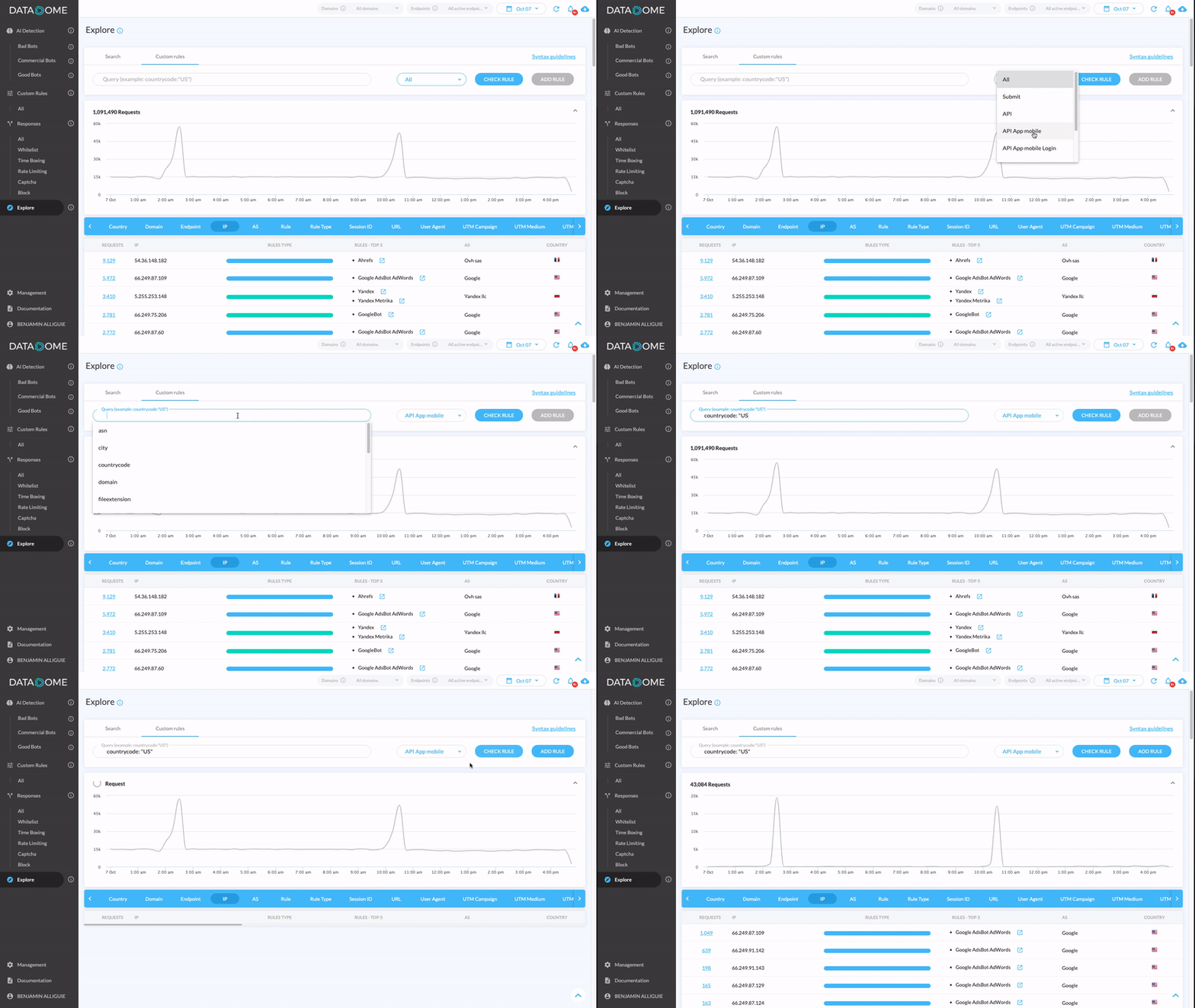
The DataDome solution makes it easy to fine-tune your configuration. Thanks to our query language, DataDome DSL, you can allow or deny access based on 13 different criteria, including referrer domain, user agent and country code. Multiple criteria can be combined with the Boolean operators AND, OR, NOT.
By default, a Custom Rule will be applied to all your online vulnerability end points, but you can also create rules only for your mobile app APIs.
The First Step in Securing Your Mobile App APIs
In order to test the DataDome solution for free for 30 days, simply install the server-side module of your choice. It typically takes less than 10 minutes, and there’s no need for a credit card.
You will get instant access to your personal DataDome dashboard, where you can view bot traffic to your mobile app API in real time.
If you also want to try the client-side module, install the SDK for Android and/or iOS, publish the app update, and go to the DataDome dashboard. The dashboard lets you filter all bot traffic data by end point, so that you can drill down to see exactly what’s going on with your app.

Related posts

How BPX Protected Revenue-Critical APIs from 6.6M Price Scraping Attacks
Tell me more

Etix Stops Ticket Scalping Without Slowing Down Real Fans
Tell me more

How Chrome’s New AI Web APIs Are Enabling Hardware Fingerprinting
Tell me more

DataDome’s Commitment to the CISA Secure by Design Pledge
Tell me more

