
How Chrome’s New AI Web APIs Are Enabling Hardware Fingerprinting
Google’s push to bring AI directly into web browsers has created an unexpected side effect: a powerful new way to identify and classify devices.
Google recently introduced new Web APIs that enable local interaction with AI models and LLMs through Gemini Nano, Google’s on-device model variant within the Gemini family. These APIs allow websites to run AI features—like text summarization or language translation—directly on a user’s device rather than sending data to cloud servers.
This approach cuts Google’s infrastructure costs while keeping sensitive user data from ever leaving the browser—a win for both privacy and performance.
But there’s a catch: these AI features only work on high-end hardware. And that hardware requirement has become a goldmine for bot detection.
When a website checks whether a device can run these AI features, it’s essentially checking the device’s hardware capabilities. Bots that spoof their browser properties often claim to be running on consumer laptops or phones, but their actual hardware tells a different story. These new APIs make those lies much easier to detect.
Several of these APIs were introduced in Chrome 138:
- Translator API: Translates user-generated and dynamic content on demand
- Language Detector API: Detects the language of input text
- Summarizer API: Condenses long-form content into short summaries
Hardware requirements create a natural filter
The Summarizer API is particularly interesting from a bot detection perspective. According to Chrome’s documentation, this API has specific hardware requirements, meaning it only works on high-end devices.
- Operating system: Windows 10 or 11; macOS 13+ (Ventura and onwards); Linux; or ChromeOS (from Platform 16389.0.0 and onwards) on Chromebook Plus devices. Chrome for Android, iOS, and ChromeOS on non-Chromebook Plus devices are not yet supported by the APIs that use Gemini Nano.
- Storage: At least 22GB of free space on the volume that contains your Chrome profile.
- GPU or CPU: Built-in models can run with GPU or CPU.
- GPU: Strictly more than 4GB of VRAM.
- CPU: 16GB of RAM or more and 4 CPU cores or more.
- Note: The Prompt API with audio input requires a GPU.
- Network: Unlimited data or an unmetered connection.
What does this mean for device identification?
Executing const availability = await Summarizer.availability(); yields one of several states:
- unavailable: the device has less than 4GB of VRAM, less than 16GB of RAM, or less than 4 CPU cores
- downloadable or available: the device has at least 4GB of VRAM, or 16GB of RAM or more, and 4 CPU cores or more
This tells us that only relatively high-end consumer devices will be able to run this API, which is already useful for traffic segmentation. By checking this single API, websites can immediately categorize devices into capability tiers.
Because this feature is currently exclusive to Chrome, our analysts can use its availability to isolate compatible sessions reliably.
The graph below shows that only 4% of global traffic is able to run the Summarizer API, with 50% unable due to insufficient hardware specs, and 46% being undefined.
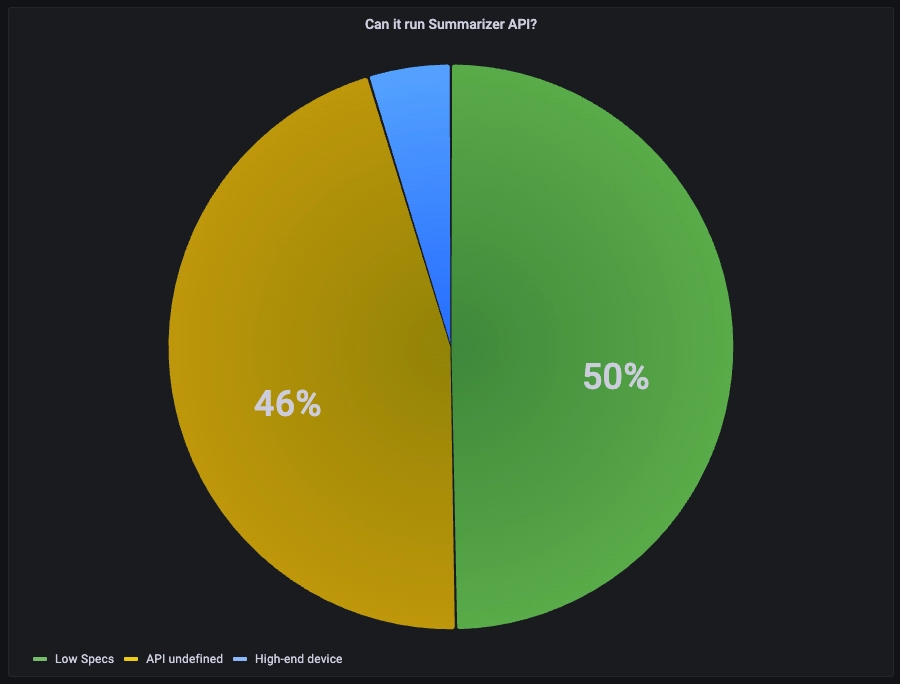
The graph indicates that only 4% of observed traffic is able to run the Summarizer API
Using API availability to detect inconsistencies
We can also look for inconsistencies by comparing API availability against other values exposed by other web APIs’ properties. For example:
- If navigator.hardwareConcurrency gives the number of logical processors, and if it’s lower than 4 but Summarizer availability indicates support, that property might have been spoofed.
- If canvas.getContext(‘webgl’).getExtension(‘WEBGL_debug_renderer_info’).UNMASKED_RENDERER_WEBGL suggests a recent MacBook and navigator.deviceMemory reports 16GB or more, but Summarizer availability is negative, the session may warrant additional scrutiny.
These cross-checks make it significantly harder for bots to maintain a consistent hardware profile.
More leaks are coming
A new API named LanguageModel is scheduled to ship in Chrome 148. Once again, it seems to offer interesting fingerprint possibilities, with even more granular hardware requirements.
This API offers multimodal support for audio, image, and text inputs/outputs.
Since these capabilities depend heavily on hardware performance, checking LanguageModel availability from JavaScript implicitly tests whether the device can support them. Each capability acts as a threshold test for different hardware tiers.
A review of Chromium source code in components/optimization_guide/core/model_execution/performance_class.cc shows the requirements associated with each capability:
- Text inference support requires either:
bool PerformanceClassifier::IsDeviceCapable() const {
  return IsDeviceGPUCapable() || on_device_model::IsCpuCapable();
}
- a GPU with performance class of at least 3, 4, 5, or 6, corresponding in practice to roughly 3GB or more of VRAM
- a CPU with RAM ≥ 15GB, ≥ 4 cores, and at least 64-bit
- Image support requires the same specs for now
- Audio support, on the other hand, requires better specs with a higher GPU requirement: more than 6GB of VRAM or the same CPU support as the others
bool PerformanceClassifier::SupportsAudioInput() const {
  // Check if the device is GPU capable and has enough VRAM.
  if (IsDeviceGPUCapable() &&
      base::FeatureList::IsEnabled(kOnDeviceModelGpuAudioInput)) {
    uint64_t vram_mb = local_state_->GetUint64(
        model_execution::prefs::localstate::kOnDeviceVramMb);
    return vram_mb >=
           static_cast<uint64_t>(kOnDeviceModelAudioInputVramMin.Get());
  }

  // Check if the device is CPU capable and the feature is enabled.
  return on_device_model::IsCpuCapable() &&
         base::FeatureList::IsEnabled(kOnDeviceModelCpuAudioInput);
}
Therefore, based on the result given by this API, we can infer the GPU performance class:
- No support: GPU with less than 3GB of VRAM and CPU with less than 4 cores and <15GB of RAM
- Support text & image only: GPU between 3GB and 6GB of VRAM and CPU with less than 4 cores and <15GB of RAM
- Support text & image & audio: GPU ≥ 6GB of VRAM or CPU ≥ 4 cores and ≥ 15GB of RAM
While this gives us a very good view of the user device architecture, LanguageModel can reveal even more interesting insights into the underlying hardware.
Inference timing: Classifying devices by actual performance
LanguageModel exposes an interesting method called promptStreaming, which streams the model’s response chunk by chunk.
In the context of local language model inference, two metrics are particularly relevant:
- Time to First Token (TTFT): the latency between when the prompt was submitted and the first output chunk is received. This measures how quickly the device can process the input.
- Decode throughput: the rate of output generation, typically measured in tokens/second.
Both metrics are measurable directly from JavaScript using performance.now() around the promptStreaming stream. By measuring how fast the AI actually performs, we can create a performance fingerprint that’s much harder to spoof than declarative properties.
for (let i = 0; i < measureRuns; i++) {
    let firstTokenTime = null;
    let totalChars = 0;
    const start = performance.now();

    const stream = session.promptStreaming("Count from 1 to 20, one number per line.");
    for await (const chunk of stream) {
      if (firstTokenTime === null) firstTokenTime = performance.now() - start;
      totalChars += chunk.length;
    }

    const totalTime = performance.now() - start;
    const estimatedTokens = Math.ceil(totalChars / 4); // Approximate token count: ~4 characters per token for English

    console.log(`Time to first token: ${firstTokenTime} ms`);
    console.log(`Throughput: ${(estimatedTokens / (totalTime / 1000)).toFixed(1)} tokens/sec`)
  }
A few points are worth noting here. Warm-up passes are necessary to load the model weights into memory. In addition, the token count is approximate since the function yields text chunks, not tokens.
For a given hardware, the throughput could vary because of thermal throttling, power modes, or system load. However, from our experimental measurements, we found the values to be relatively stable over time.
To infer a hardware family from these signals, bot detection teams could maintain a lookup structure that maps throughput and TTFT ranges to hardware clusters, a technique comparable to Google’s Picasso, or earlier AudioContext timing fingerprinting techniques.
What makes this approach particularly interesting is not flawless fingerprinting, but the cost increase for attackers. Reproducing a coherent inference profile that remains aligned with the rest of the browser fingerprint is far more demanding than patching a few JavaScript properties. An attacker would need to either:
- Actually possess the hardware they claim to have (expensive at scale)
- Perfectly simulate AI inference timing patterns (extremely difficult)
- Accept that their spoofed properties will be inconsistent with performance tests (easily detected)
This method remains highly experimental because browser implementations are still evolving, timing remains noisy, and future privacy mitigations may reduce its precision. Still, it remains an interesting prospect in the never-ending cat-and-mouse game.
Why this matters for bot detection
For defenders, this creates a new class of signals that can strengthen device intelligence when used in combination with existing telemetry. Unlike many declarative browser attributes, these performance-based signals are tied to actual execution capability, which makes them considerably more expensive to spoof at scale.
For browser vendors, it raises a common question: how much information can the platform expose before useful features become fingerprinting entropy? As local AI becomes an ever-growing browser feature, that tension will likely become increasingly difficult to ignore.
At DataDome, we continuously monitor browser changes to identify new ways to detect bots, AI agents, and mitigate cyberfraud. These AI APIs represent a significant shift: instead of asking browsers what they claim to be, we can now test what they can actually do.
Run a free Vulnerability Scan today to see if your website is properly protected against bad bots and malicious AI agents, or book a demo to learn more about DataDome.

Related posts
How 1001Pneus Blocked Competitor Price Scrapers & Reclaimed Its Competitive Edge
Tell me more

How to Stop Bot Traffic From Crashing Your Site During Black Friday 2026
Tell me more

Which Industries Are Least Protected From Bots & Spoofed AI Agents in 2026?
Tell me more

Why Layering a Specialist Bot & Agent Trust Solution With Your CDN Is Now Essential
Tell me more