

The Art of Bot Detection: How DataDome Uses Picasso for Device Class Fingerprinting
Catching sophisticated bots requires all kinds of signals—from behavioral signals, to proxy detection, to client-side fingerprints.
Indeed, as sophisticated bots leverage proxies, mimic human behavior, and attempt to forge several fingerprinting attributes, it’s important to have redundancy and exhaustivity in the signals collected to ensure all bots are detected.
When it comes to client-side browser fingerprinting, DataDome collects signals in 3 different ways:
- In our JavaScript tag: a JS agent running in the background on the page of a site.
- When we respond to a request with a CAPTCHA.
- When we respond to a request with DataDome Device Check.
In these various components, we collect different kinds of browser fingerprint signals discussed in other blog posts, ranging from:
- Information about the browser, the OS, and the device—such as browser version, number of CPU cores, device memory, type of GPU, etc.
- Specially-crafted challenges that aim to detect side effects introduced by anti-bot-detection frameworks and headless/automated browsers.
While some APIs provide information about the OS and the environment the browser is running on, bot developers often modify these values to appear more human. Thus, a bot running on a Linux virtual machine may lie about its OS to pretend it’s running on a Windows machine. They may not even lie about the OS string alone, but about other attributes you’d expect to go with a particular OS, such as the type of GPU.
To avoid relying on static APIs returning information about the OS, researchers have come up with ways to ask a browser to execute a JS challenge, which can help determine the nature of its environment. When these tests aim to detect virtual machines, they’re named red pills (in reference to The Matrix movie).
In this blog post, we present how DataDome leverages Picasso, an approach originally conceived by Google, in our CAPTCHA and Device Check to detect bots lying about their environment.
What is Picasso?
Picasso is a device class fingerprinting protocol that enables a server to verify whether or not a device is lying about its browser, OS, or its environment in general.
Usually, when we refer to an approach like browser fingerprinting, a fingerprint is a combination of attributes that is—more or less—unique and stable, and can help identify an individual. In the case of device fingerprinting, the goal is not to identify a single individual, but instead to identify a class of devices. In the case of Picasso, we aim to identify classes defined by the nature of their browser (Chrome, Firefox, Safari) and their OS (Windows, Linux, Mac, iOS, Android).
To do that, Picasso leverages the HTML canvas API, and in particular the graphic rendering system (GPU). The server sends a proof of work challenge to an untrusted user whom we want to verify the nature of the device. The Picasso challenge then captures the entropy induced by a device’s underlying hardware.
The reason Picasso succeeds in identifying the type of OS and browser lies in the incidental yet stable pixel rendering differences across devices, due to their inherent features—both physical (graphical hardware) and software (graphical drivers, operating system)—which makes this type of fingerprinting possible (Figure 1).
In other words, the output of a web browser graphics, such as HTML5 canvas, depends on different layers, from hardware (GPU), to lower level software (GPU driver, OS rendering), to higher level software (browser and library provided graphics API). This makes an HTML5 canvas output—for an exact same set of instructions—highly unique per OS/browser, and allows accurate differentiation between them (Figure 2).


How is Picasso implemented at DataDome?
DataDome leverages Picasso in both our CAPTCHA and our newly released Device Check response to verify the nature of the user device in the background.
Learning Proper Picasso Values
Picasso requires a learning phase. The first stage of the learning phase is conducted offline before the system is put in production, and another phase is performed online while the system is running in production. The goal of the two phases is to map, for a given challenge seed, the various device classes the responses correlate to.
For example, with seed = 3, the Picasso challenge will ask the device to draw two lines, three ellipses, and apply different color gradients. The output of this challenge will differ depending on the end-user device, in particular its browser and OS.
Thus, during the learning process we want to associate each given challenge and result with a device class. To avoid being polluted by bots that would return modified Picasso values or that forged their browser/OS information, we exclude traffic that matches already known fingerprinting inconsistencies—and we give priority to a more trustworthy subset of traffic.
Leveraging Picasso to Detect Spoofed Devices Without Impacting UX
Figure 3 (below) illustrates how we leverage Picasso in our CAPTCHA and Device Check:
- An untrusted client (potential bot) is met with the DataDome CAPTCHA or Device Check challenge.
- The Picasso server sends the untrusted client a challenge with a random seed, composed of a set of N iterations of graphical instructions such as quadratic curve, bezier curve, circle, and font.
- The client renders these graphic instructions. Rendering occurs in the background, completely invisible to the end user.
- The client hashes the canvas output and sends the end hash result back to the Picasso server.
- The Picasso server makes a verdict based on the output hash; verified humans are allowed through, and bots are blocked.
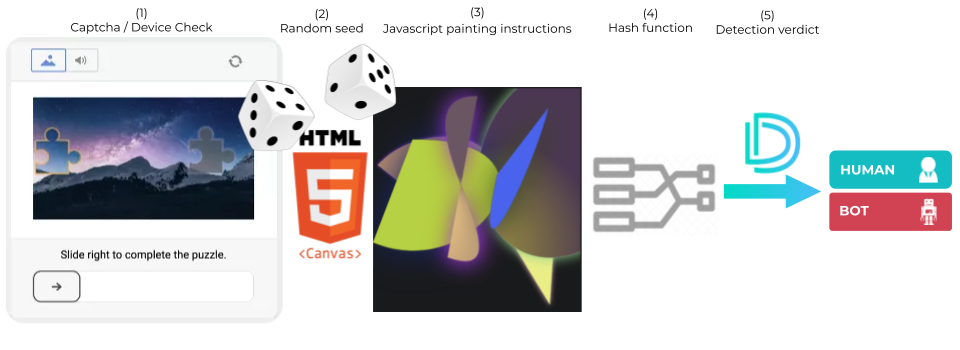
Picasso uses a different random seed each time to prevent replay attacks.
When the response of the challenge is verified, such as on the callback of the Device Check or the CAPTCHA challenge, the server verifies if the value provided by the user matches the proper OS/browser configuration.
In case a misconfiguration is detected, e.g. a Picasso value linked to a Linux OS on a user claiming to be running on Windows in its user-agent, then the user cannot continue to browse the website/mobile application.


Results
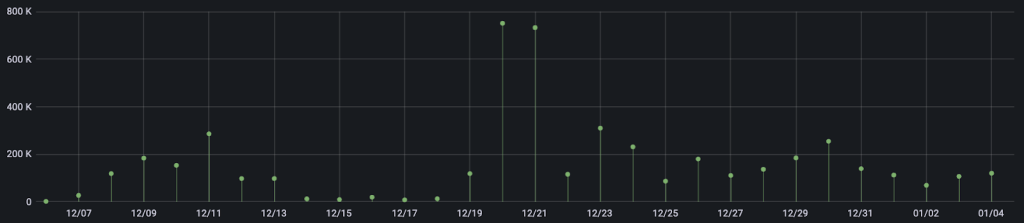
The graph below shows the number of malicious CAPTCHA passing attempts stopped by Picasso over the last 30 days. Over this period, Picasso stopped more than 4M malicious CAPTCHA passing attempts submitted by bot users, with spikes of over 750k CAPTCHAs per 24h.
While Picasso is effective at detecting bots that lie about the true nature of their environment, this may not be the best approach to detect bots that don’t need to lie about it, e.g. an automated Chrome running on Windows. That’s why at DataDome we collect other types of signals in our CAPTCHA and our Device Check, such as:
- Browser fingerprinting signals.
- Behavioral patterns.
- Different types of reputations (session, IP).
- Residential proxy detection.
Ready to see Picasso in action? Try DataDome for free, or request a live demo today.

Related posts

How to Stop Bot Traffic From Crashing Your Site During Black Friday 2026
Tell me more

Which Industries Are Least Protected From Bots & Spoofed AI Agents in 2026?
Tell me more

Why Layering a Specialist Bot & Agent Trust Solution With Your CDN Is Now Essential
Tell me more

Introducing DataDome’s AI Key Takeaways Feature: Understand Your Protection at a Glance
Tell me more