


What Is a CAPTCHA and How Does It Work
You’ve almost certainly encountered a CAPTCHA during your time online. But why do you have to deal with them so often?
Cybercriminals program bots to roam the internet, looking for ways to manipulate your pages, access your databases, and steal your data. In fact, bots make up more than 40% of online traffic.
Any website can become a target of brute force attacks, digital ad fraud, transaction fraud, and personal data harvesting via malicious bots. CAPTCHAs were designed to shield and protect websites from malicious bots. But in the age of AI, traditional CAPTCHAs are no longer effective.
What is a CAPTCHA?
The acronym CAPTCHA stands for “Completely Automated Public Turing Test to Tell Computers and Humans Apart”. It’s a challenge-response test websites use to quickly differentiate real human users from bots.
Websites use CAPTCHA tests to determine whether an actual user or a bot is attempting to access a web page. The original CAPTCHA tests, which first appeared in the late 90s, were made up of distorted images containing a combination of random letters and numbers.
How do CAPTCHAs work?
When a CAPTCHA is triggered, a pop-up window may appear when users attempt to access specific pages or input information, prompting the user to complete a CAPTCHA test. Original text CAPTCHAs would twist and bend letters and numbers out of shape, changing proportions and making it hard for bots to figure out what was on the screen.
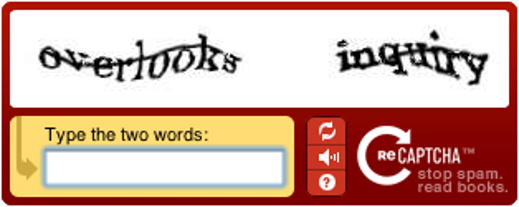
An example of an early CAPTCHA
Color gradients and other background noise make things tough for computers and spambots. CAPTCHA codes can’t be copied, so basic bots fail the test. Later versions of CAPTCHA use images and ask users to identify which pictures contain a certain object. Some versions of reCAPTCHA are also “invisible”, but not entirely effective at blocking bots. In fact, all types of traditional CAPTCHAs, including reCAPTCHA, have now been outpaced by many bot developers.
In essence, if a CAPTCHA challenge is not triggered or is successfully passed, the user is assumed to be human and is allowed to access website resources as normal. If they fail, the user is assumed to be a bot. The majority of CAPTCHA systems have no way to automatically find false positives and negatives.
What are CAPTCHAs used for?
CAPTCHAs aim to prevent bots posing as humans from accessing resources meant for human users. There are many reasons we don’t want bots to access certain web pages. Bad bots can:
- Create fake accounts and waste precious resources. Malicious hackers use the fake accounts to increase traffic, overload servers, and even deny real customers your services. They can also spam other users or initiate phishing campaigns.
- Take over sites by spamming comments and contact forms. If left unchecked, bots can fill websites with comments and messages containing dangerous links. Users who click on the links become vulnerable to potential scams.
- Allow scalpers to purchase large quantities of in-demand tickets and other products. Products are then resold at a higher price, frustrating real customers.
- Skew online polls by voting uncontrollably. They can also skew product ratings on various sites, like Amazon, to make items appear better or worse.
- Secure payment processes: Some e-commerce websites and applications have implemented CAPTCHAs on their payment pages. This acts as an additional step to prevent bots, which use lists of breached or stolen payment card data, from carrying out transactions.
At first, traditional CAPTCHAs were quite effective at stopping bots from performing malicious tasks on the internet. Bots were simpler back then, and could not read distorted letters and numbers to solve the challenges. However, as bots have become more sophisticated, they’ve learned how to pass many different types of CAPTCHA challenges.
What is the difference between CAPTCHA and reCAPTCHA?
If you’ve heard of CAPTCHA, chances are you’ve heard of reCAPTCHA too. Here’s the difference: CAPTCHA is a generic term that refers to any type of challenge-response test used to determine whether a user is human or a bot, while reCAPTCHA is Google’s specific implementation of CAPTCHA technology.
Google developed reCAPTCHA to implement advanced algorithms and machine learning to determine whether a user is human or not, which is considered more secure than traditional CAPTCHAs. Key differences include:
- Technology: reCAPTCHA uses more sophisticated detection methods including IP tracking, user behavior analysis, and machine learning models. Traditional CAPTCHAs rely primarily on visual or audio challenges.
- User experience: Traditional CAPTCHAs can be difficult and frustrating for users to complete. ReCAPTCHA uses a range of interactive tasks, such as image recognition and mouse tracking, to create a more user-friendly experience.
- Data collection: reCAPTCHA analyzes extensive user data and behavior patterns, while basic CAPTCHAs only evaluate the specific challenge response.
- Evolution: reCAPTCHA has evolved through multiple versions (v1, v2, v3) with increasingly sophisticated detection methods, while traditional CAPTCHAs have remained relatively static.
What are the different types of CAPTCHA?
Traditional CAPTCHAs come in many shapes and forms:
Text CAPTCHA
This was the most common type of CAPTCHA found on websites for many years, in which the user needed to type in the displayed word (or words) to pass the test. The “word” usually consists of disjointed, blurred, elongated, or otherwise distorted text. To make things slightly more challenging, the displayed text is often obscured by a blurry/distorted background.
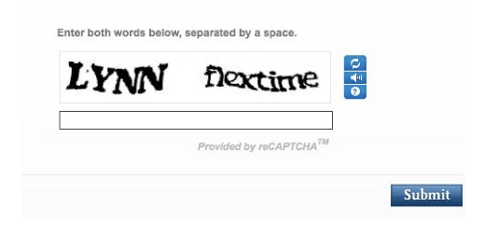
Specific text CAPTCHA techniques include:
- Gimpy: Provides an arbitrary number of words from a dictionary in a distorted fashion
- EZ-Gimpy: A variation of Gimpy that uses only one word
- Gimpy-r: Selects random letters, then distorts and adds background noise to characters
- Simard’s HIP: Selects random letters and numbers, then distorts characters with arcs and colors
As an authentication method, text CAPTCHA has received a lot of criticism. Sometimes the tests are too difficult to read and lack
accessibility —especially for people with visual impairments.
Image CAPTCHA
With image CAPTCHAs, users are given multiple images and are told to pick the ones that contain a specified object. This form of CAPTCHA is very effective: image recognition is easy for humans (arguably easier than text recognition), but bots and computers have a hard time with image pattern recognition—until the last few years, that is.
Google, for example, combines its massive street view image library with artificial intelligence to generate quick CAPTCHA images on the spot. (That’s why you’re always clicking on street signs, lamp posts, and fire hydrants!) These CAPTCHA challenges are used to train Google’s image recognition machine learning models.
Image CAPTCHA variations include:
- Selecting images of certain objects from a collage
- Rearranging jigsaw-like images to recreate the original
- Rotating images that users must click when upright
- Identifying specific objects within complex scenes

Audio CAPTCHA
Accessibility is key, meaning as many people as possible need to be able to solve the challenge. As an alternative testing method, CAPTCHAs should allow users to click on a small speaker button for an audio CAPTCHA. With audio-assisted text CAPTCHA, the generated voice either spells out the letters/numbers or mentions words that begin with the specified letters.
If a user clicks the headphones button on a visual CAPTCHA, they’ll have to solve an audio challenge instead. The audio file includes several numbers that must be entered correctly to complete the challenge.
Alternative CAPTCHAs
Some websites prefer to switch from traditional CAPTCHAs to other types of CAPTCHA. These include:
- Math solution: Users have to solve a basic math problem (e.g. 3+2) to continue.
- Word problem: A word problem might have users rearrange letters, input the color of the text, or state the last word from a sentence.
- Social media sign-in: Users can sign in simply by using their Google or Facebook accounts.
- Time-based: Users that exhibit bot-like behavior (completing forms within a fraction of a second) are automatically blocked.
- No CAPTCHA reCAPTCHA: All users have to do is click the “I’m not a robot” checkbox. By tracking mouse movement, among other things, Google predicts whether the user is human.
- reCAPTCHA v3: The newest reCAPTCHA version works behind the scenes to identify bots and trigger actions without user interaction.
What triggers a CAPTCHA test?
Ideally, suspicious behavior triggers a CAPTCHA test. Common triggers include:
- IP tracking: A user’s IP has been identified as a bot.
- Resource loading: A user doesn’t load styles, banners, or images.
- Sign in: The user isn’t signed in to Google/Gmail when accessing the site.
- No browsing history: Real humans do more than try to log in to the same page over and over.
- Traffic volume: Requests coming too quickly from a single source.
- User agent anomalies: Unusual or missing browser identification strings.
- Bot-like behavior: Weird clicking patterns, little mouse movement, and perfectly-centered checkbox clicking can all trigger a CAPTCHA test.
Examples of CAPTCHA in action
- E-commerce checkout: Online retailers often implement CAPTCHAs during checkout to prevent bots from completing fraudulent purchases or depleting inventory.
- Account registration: Social media platforms and online services use CAPTCHAs to prevent mass creation of fake accounts.
- Contact forms: Business websites protect contact forms from spam by requiring CAPTCHA completion before message submission.
- Poll and survey protection: News websites and research organizations use CAPTCHAs to ensure survey responses come from real humans, maintaining data integrity.
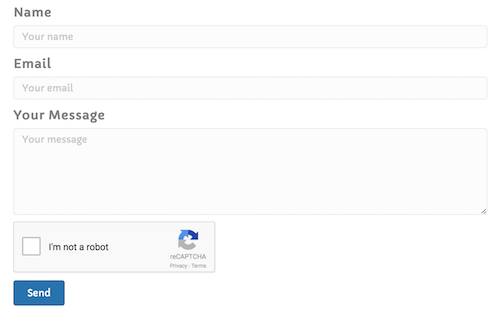
Contact form CAPTCHAs are quite a common sight
What are the cons of CAPTCHAs?
While once effective, traditional CAPTCHAs are now largely obsolete. They are not a reliable standalone defense against modern, sophisticated bots. Here are some of their significant limitations:
- User experience issues: A CAPTCHA test can interrupt the flow of what users are trying to do, giving them a negative view of their experience on the web property, and leading to them abandoning the webpage altogether in some cases.
- Accessibility problems: The problem with CAPTCHAs is that they rely on visual perception. This makes them nearly impossible, not just for people who are legally blind, but for anyone with seriously impaired vision.
- Browser compatibility: Some CAPTCHA types do not support all browsers or older devices, potentially excluding legitimate users.
- Privacy concerns: reCAPTCHA collects extensive user data for Google’s advertising ecosystem, raising GDPR and privacy compliance questions.
How do advanced bots bypass CAPTCHAs?
Today’s bot developers use several sophisticated methods to bypass most CAPTCHAs:
- Machine learning solutions: There are many ways to write a program that beats CAPTCHAs. AI-powered bots can now not just solve many traditional text and image CAPTCHAs, but they can do so faster than humans can.
- CAPTCHA farms: Attackers can use click farms to beat CAPTCHAs, i.e. thousands of low-paid workers solving CAPTCHAs on behalf of bots. These services allow sophisticated bot operators to outsource CAPTCHA-solving to humans for pennies per challenge.
- Behavioral mimicking: Advanced bots can simulate human-like mouse movements, clicking patterns, and browsing behavior to fool detection systems that rely on behavioral analysis.
- Browser automation tools: Modern headless browsers and automation frameworks can execute JavaScript and mimic legitimate browser fingerprints, making detection much more difficult.
6 CAPTCHA alternatives
While CAPTCHAs remain widely used, several alternatives provide similar security benefits with better user experience:
- Honeypots: Invisible fields that are added to web forms to detect bots. Human users can’t see or interact with these fields, but bots will try to fill them out, allowing websites to easily identify and block them.
- Two-factor authentication: Two-factor authentication (2FA) is a security process that requires users to provide two forms of identification before they can access a system or service. This can include something the user knows (such as a password) and something they have (such as a smartphone or security token).
- Behavioral analysis: Tools can be used to identify and block bots based on their browsing behavior. This might include the speed at which they navigate through a website, patterns of mouse and touchpad movements or scrolling and tapping behavior on smartphones.
- Email verification: To confirm the identity of a user by sending a verification link or code to their email address.
- Proof-of-work challenges: Crypto challenge mitigation is based on the cryptographic proof-of-work concept used in various blockchains and designed to deliver continuous, invisible browser-based challenges to suspected bots.
- Advanced bot detection: Modern bot detection solutions like DataDome use machine learning, device fingerprinting, and real-time behavioral analysis to identify bots without requiring user interaction.
DataDome: A Frictionless CAPTCHA Alternative
Traditional CAPTCHAs fail against modern bots and create a frustrating user experience. DataDome offers a better approach. Our bot and online fraud protection solution uses a verification-first strategy that is invisible to most users. We prioritize a frictionless experience while ensuring top-tier security.
Our system analyzes signals in real-time, and only when additional verification is needed do we present a frictionless verification, a simple, user-friendly slider. This enables us to collect more behavioral data without resorting to frustrating puzzles. Most of your users will never see a challenge, and those who do will have a quick and easy experience.
With an industry-leading false positive rate of 0.01%, we ensure that legitimate users are not blocked. Our solution is accessible, privacy-compliant, and designed for the modern web.
See for yourself with a demo.
FAQs
Yes and no. While CAPTCHAs alone can help stop very simple bots, they no longer perform their original objective: stopping all bots without creating a negative user experience for humans. Traditional CAPTCHAs are siloed, so they perform without consideration of any other signals besides the pass or fail of the challenge—but other signals are required for rooting out today’s sophisticated bots. CAPTCHAs cannot work to stop bots on their own, and are best when paired with powerful bot detection.
DataDome offers a privacy-compliant and user-friendly CAPTCHA alternative that works with our real-time bot and online fraud detection. It is only used when our detection engine needs further verification, ensuring a seamless experience for the vast majority of users.
ReCAPTCHA, acquired by Google in 2009, is a particular brand of CAPTCHA test. The first version of reCAPTCHA had distorted text and challenged users to decipher and type the text in a field.
Version 2 of reCAPTCHA is still in use and has a few different sub-versions: no CAPTCHA (user clicks the “I’m not a robot” checkbox) and invisible reCAPTCHA (the “I’m not a robot” checkbox is bound to a different button on the website). Version 3 has no checkbox, instead monitoring on-page user behavior to give users a score—the closer to 0, the more likely the user is a bot.
Yes, traditional CAPTCHAs can be and often are easily bypassed by bots. Bots have become increasingly able to fake human-like behavior and fingerprints. With reCAPTCHA, they can even achieve a “human” score for version 3, and will not be stopped or challenged.
Today, many bots that face a CAPTCHA challenge can simply have a human solve it for them using CAPTCHA farms. Additionally, progress in machine learning has enabled some bots to solve CAPTCHAs themselves through ML image or audio recognition.
CAPTCHAs aim to prevent spam much the same way CAPTCHA alternatives like honeypots, rate limiting, and WAFs do. Simple bots are generally caught by the filters and cannot solve the challenges, sometimes slowing the bots down enough that the spammer moves to a different target. But most bots today are much too sophisticated to be stopped by any siloed CAPTCHA.
CAPTCHAs present significant challenges for users with disabilities. Visual CAPTCHAs are nearly impossible for users with visual impairments, while audio CAPTCHAs can be difficult for users with hearing impairments. Many CAPTCHAs also don’t work well with screen readers or assistive technologies, potentially excluding legitimate users from accessing websites.
While CAPTCHAs can provide some protection against simple bots, they come with trade-offs. Traditional CAPTCHAs may compromise user privacy (especially reCAPTCHA), create accessibility barriers, and harm user experience. Modern alternatives that don’t require user interaction while maintaining security are generally safer choices for both privacy and usability.

Related posts

Bad Bot Traffic Is Growing 9x Faster Than Human Traffic: Takeaways From The 2026 State of Bot & Agent Security Report
Tell me more

DataDome Recognized as a Sample Vendor in the Gartner® Hype Cycle™ for Application Security, 2026
Tell me more

Key Takeaways From Our Conversation With Forrester on the State of Bot & Agent Trust Management
Tell me more
How to Block AI Bots, Crawlers, & Scrapers
Tell me more

