


Building a Notion-Based RAG SlackBot in One Day: Our Internal Hackathon Journey
During peak periods, locating technical procedures in Notion can be challenging. DataDome uses Notion to document over 500 internal technical procedures, including deployment steps and on-call runbooks. While this documentation is comprehensive, the sheer volume can make it hard to find relevant information quickly.
To solve this, we launched a one-day hackathon project to build an internal Retrieval-Augmented Generation (RAG) system—accessible directly from Slack. The result? DomeRunner.
This AI assistant is lightweight, secure, and cost-efficient. It can answer complex technical questions and provide contextual links to the most relevant Notion pages, helping us focus our time on work that adds real value. What used to take hours of cumulative searching through Notion now takes just minutes with natural language queries.
In this article, we’ll explain the architecture, AI models, and infrastructure setup behind our homemade RAG system.
How we handle incident management at DataDome
At DataDome, incident management involves minimizing impact, resolving issues swiftly to maintain our Service Level Agreements (SLAs), and ensuring seamless customer experiences. When an incident occurs, it’s declared in a dedicated Slack channel, where the response is coordinated.
The first goal in any incident is to mitigate the impact. The team documents each action taken to create a clear timeline of what has been done and when, helping maintain transparency throughout the process.
Incidents are primarily the result of internal monitoring systems, but can also be triggered by the support team or our customers. Internal monitoring is key to detecting issues before they affect users, enabling proactive management, and reducing the likelihood of customer-facing impacts.
The RAG backbone: How it works
Before exploring the technical implementation, let’s first start by explaining what a RAG is and why you should use it.
What is RAG?
Retrieval-Augmented Generation (RAG) differs from standalone large language models (LLMs) by enhancing generation with relevant external data, instead of relying solely on the model’s internal knowledge. In our case, that external data consists of more than 500 Notion pages.
The system operates in three main steps:
-
Retrieval: The user’s query is embedded into a vector and matched against a pre-indexed FAISS (Facebook AI Similarity Search) database to retrieve relevant Notion content.
-
Augmentation: The retrieved content is appended to the original query to provide additional context.
-
Generation: The combined prompt—original question plus context—is passed to an LLM hosted on AWS Bedrock to generate the final answer.
Why should you use RAG?
LLMs are known for their static knowledge. For example, OpenAI’s latest models, including GPT-5, are trained on data up to June 2024.
If you want to incorporate your own data into an LLM, you typically have two options:
-
Retrain the model with your internal data and documentation—a time-consuming and expensive process that doesn’t scale well when you need to add, update, or remove information.
-
Manually provide context in each prompt by including relevant background information.
RAG offers a scalable, cost-effective alternative. It allows you to expand an LLM’s knowledge dynamically by injecting up-to-date, domain-specific context into each query—no retraining required.
Models used
As outlined in the previous section, a RAG consists of three components: an LLM, an embedding model, and a vector store.
In this section, we will focus on the different choices made during the development of our internal RAG.
LLM: DeepSeek R1 with AWS Bedrock
We opted for DeepSeek R1 hosted on AWS Bedrock. It delivers competitive performance in multilingual technical contexts and supports low-latency inference at scale. The model’s strong grounding in structured procedural text made it particularly well-suited for our use case.
During the project’s initial phase, we leveraged LLama 3.1 405b due to our prior experience with it in another project, the automation of Post Mortem creation: How DataDome Automated Post-Mortem Creation with DomeScribe AI Agent
Embedding model: gte-multilingual-base
Regarding embeddings, we evaluated models on the Hugging Face MTEB (Massive Text Embedding Benchmark) leaderboard and selected gte-multilingual-base.
It brings two interesting points regarding our use case:
- It allows for the usage of long context by supporting text lengths up to 8192 tokens.
- It has mixed language capacity, as some of our users tend to ask questions in French even if our documentation is in English.
Vector store: FAISS
We use FAISS to store and retrieve embeddings. It is open-source, highly optimized for approximate nearest neighbor (ANN) search, and works well for in-memory databases with minimal operational overhead.
Regarding the limited amount of data to be ingested, with an order of magnitude of hundreds of documents, FAISS demonstrated promising results in terms of ingestion and search duration.
Both the ingestion and search processes are executed in a matter of milliseconds for each document.
Infrastructure, security, & cost
Next, let’s look at the foundation that keeps DomeRunner running smoothly. We’ll break down the infrastructure choices, the security measures we put in place, and how we managed to keep the overall cost surprisingly low.
Kubernetes architecture on AWS EKS
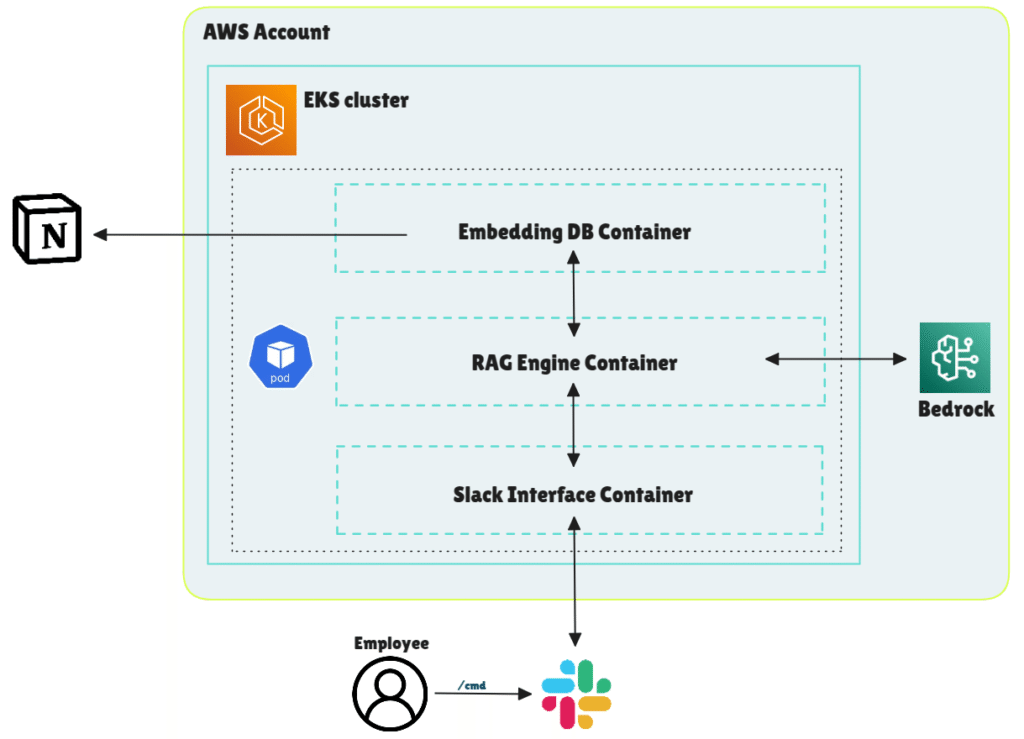
The application runs in a pod deployed on our managed Kubernetes cluster (EKS). The pod contains three distinct containers:
- Slack interface container
- Handles interactions with the Slack API
- Receives and responds to user interactions
- RAG engine container
- Accepts user question and sends it to the embedding engine
- Gathers retrieved context and formulates the prompt
- Sends the prompt to AWS Bedrock and returns the final answer
- Embedding DB container
- Hosts the FAISS vector store with precomputed embeddings of Notion pages
- Accepts vector search queries from the RAG container
Security controls
- Slack access restriction: The bot is exclusively available to members of our technical department via Slack, ensuring that access to information is strictly regulated.
- Data residency: All data is processed and stored within our VPC. AWS Bedrock guarantees that our data will not be used for training or sent to model providers.
- Least privilege: IAM roles are scoped to the minimum permissions required for each container, and communication between services is limited to localhost within the pod.
FinOps: High efficiency, low cost
Despite the use of advanced machine learning models and AWS infrastructure, the project is surprisingly affordable:
- Compute: The three containers have minimal resource requirements. FAISS operates in-memory with low CPU usage.
- Inference cost: After calculating the number of tokens sent to AWS Bedrock, we determined that the cost was approximately $0.01 per query. This is significantly lower than the vendor offerings for similar services, which typically range from $20 to $25 per user per month.
Total infrastructure cost? Nearly negligible.
Document selection
At DataDome, the vast majority of our technical documentation is created using Notion.
A naive approach could have been to simply import all of our Notion technical pages into FAISS. However, an analysis of the pages revealed that many of them lack the necessary information and context for an LLM.
As an example, we could consider project status pages. These databases contain reports from weekly or bi-monthly status meetings. The following topics are addressed in these pages: the next steps, areas of challenge, and completed tasks.
While these may offer valuable insights, they could potentially disrupt the LLM by introducing inaccurate information.
Consequently, we have decided to focus on a well-known internal database: our Technical Procedures.
This Notion database contains all the necessary information for:
- Operating evolution in production
- Creating infrastructure
- Best practices or documentation for tools such as Atlantis or Jenkins
- Handling a production incident
We have ensured that the LLM has been fed only up-to-date and meaningful information by selectively choosing the documentation ingested into FAISS.
Usage & outcome
Now that all the elements of our RAG have been described, let us review its outcome.
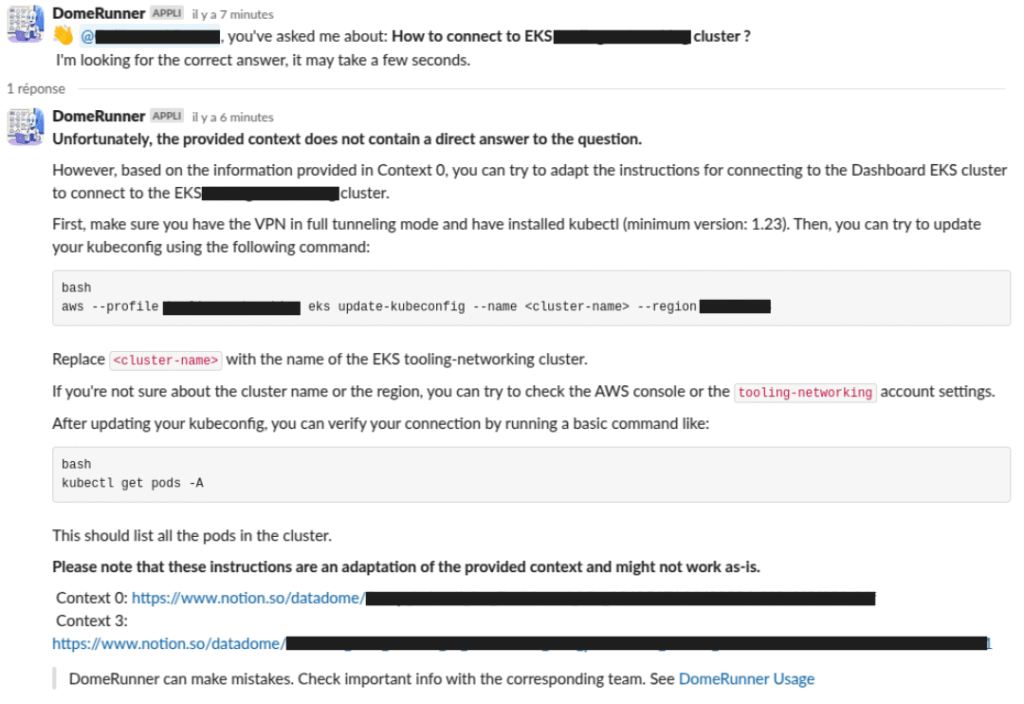
DomeRunner can be invoked within a Slack channel using the /ask command. The answer takes less than 1 minute to fully generate.
Presently, all messages and interactions with DomeRunner are publicly visible to the entire tech department. This enables us to swiftly assess the quality of the answers while ensuring that no one is misled by hallucinations.
After conducting our initial internal benchmark, we noted that DomeRunner correctly answered all questions for which we had meaningful documentation on the topic.
Key takeaways
While building a RAG system might seem like a multi-week effort, our one-day hackathon proved otherwise. With modern cloud infrastructure, open-source tools, and the right LLMs, it’s entirely feasible to build an internal AI assistant in under 24 hours.
The results were surprisingly strong for such a short project—delivering accurate answers whenever the correct context was available. It’s already helping multiple teammates in their day-to-day work by saving time and reducing the burden of searching through documentation. It also promises to make onboarding new team members faster and smoother.
The impact on operational efficiency is immediate, and the cost is minimal. As we continue to expand the system, we’re confident it will become a key part of our internal tooling ecosystem.
If your team spends a lot of time managing or navigating documentation, a Slack-based RAG assistant could be a powerful addition to your workflow.

Related posts
Meta’s Muse Is Bringing Agentic Browsing to the Masses. Here’s Why That Matters
Tell me more
Bad Bot Traffic Is Growing 9x Faster Than Human Traffic: Takeaways From The 2026 State of Bot & Agent Security Report
Tell me more
Web Bot Auth & Know Your Agent: Why Identity Isn't Enough
Tell me more
DataDome Recognized as a Sample Vendor in the Gartner® Hype Cycle™ for Application Security, 2026
Tell me more

