


New feature: Export your bot traffic reports.
Earlier this year, we announced a new Explore function in our bot traffic analytics dashboard. The Explore view gives you detailed data about the bots that come to your websites and mobile APIs, classified along more than a dozen different dimensions. This enables you to perform detailed analyses of your bot traffic.
Now, we’re making it easier than ever to collect and evaluate your bot traffic data, by introducing a new export function for your pre-filtered reports.

You can export reports either from one of the dashboard’s bot family pages (Good bots, Commercial bots, Bad bots), or from the Explore page itself.
How it works and why it’s useful.
Let’s say you’re a sysadmin. Your company has recently parted ways with several technical partners and concluded new deals with others, and you need multiple people to review the list of bots your DataDome setup is configured to allow.
In the DataDome dashboard, you simply go to the “Good Bots” page, where you’ll now find an Export button in the top right corner. You click the button, select your preferred download format (xlsx or csv), and download the list of the good bots that your configuration allows.
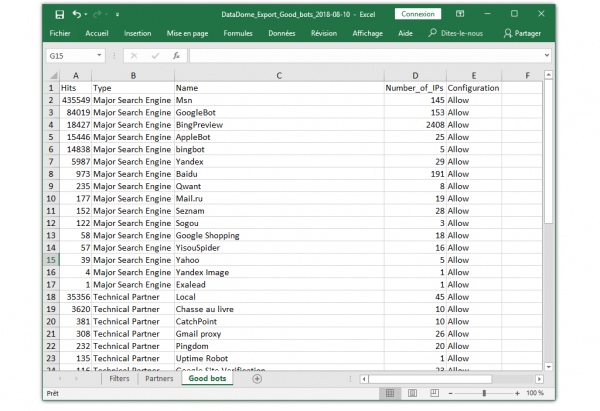
Or maybe you’re the marketing manager, always on the lookout for new ways to generate revenue. You’ve heard rumors that it’s possible to turn bot traffic into business opportunities, and you want to find out more.
You log in to the DataDome dashboard and click Explore. In the Explore window, you select Commercial bots in the Bot family dropdown menu, and Bot Name as the dimension.
And voilà, you can now easily export a list of commercial companies with a demonstrated interest in the data your company generates, and start working to identify potential profitable partnerships.

As of today, the Explore window enables you to filter your traffic by Bot family, Bot name, Bot type, Session ID, Country, Domain, IP, IP Owner, Segment, URL, User Agent, UTM Campaign, UTM Medium and UTM Source.
To learn more about working with DataDome reports and analytics, check out our technical documentation.
Related posts

Introducing DataDome's Hosted MCP Server for Direct AI Agent Access to Trend Reports
Tell me more

Account Protect Updates: Clearer Visibility, Stronger Signals, & More Control
Tell me more
Q2 2026 Product Roundup: Agent Trust, Priority Protect, & More
Tell me more
The DataDome Homepage: Your Command Center for Trust & Control
Tell me more

