


Detecting Headless Chrome’s Puppeteer Extra Stealth Plugin with JavaScript Browser Fingerprinting
The headless mode of the Google Chrome browser, Headless Chrome, has been incredibly popular since its launch in 2017. A very useful tool for running automated tests, Headless Chrome is also extremely convenient for automating malicious web traffic, aka bots.
Here we will examine headless browsers, Headless Chrome, and the technologies bot developers are using to avoid detection, with particular focus on a library called “puppeteer-extra-plugin-stealth”.
What is a headless browser?
The graphical user interface (GUI) of a program is referred to as the head. Ergo, a headless browser is a browser without a GUI, which means it doesn’t render anything on the screen. Instead of controlling the browser’s actions via GUI, users control headless browsers via code instructions.
Under the hood, headless browsers behave just like other browsers. This makes them very convenient for developers, who benefit from all the features of real browsers, but need much less CPU/RAM.
Headless browsers can be used to run large-scale tests of web applications, navigate between pages without human interference, validate JavaScript functions, and much more. The most popular headless browser is Headless Chrome.
Unfortunately, headless browsers are also used for automating malicious tasks. The most common use cases are web scraping, credential stuffing/account takeover, increasing ad impressions, and scanning for vulnerabilities on a website.
What is Puppeteer?
To instrument Headless Chrome, developers can either use CDP (Chrome DevTools Protocol) or a higher-level framework. One such framework is Puppeteer, a NodeJS library that provides a high-level API to control Headless Chrome or Chromium over the DevTools Protocol.
Puppeteer helps bot developers create their bots faster, since it already provides functions for many key tasks such as navigating to a page, waiting for a CSS element to be visible, etc. A light-weight wrapper called “puppeteer-extra” augments Puppeteer with plugin functionality, as detailed below.
Puppeteer’s success prompted others to follow suit. In 2020, Microsoft released Playwright (created by the team behind Puppeteer), an automation framework that allows developers to perform tests across multiple browsers.
Can Puppeteer be detected?
For bot developers, Puppeteer’s most useful feature is that it provides full browser functionality in addition to running Chrome in headless mode on a server. In this way, JavaScript content will be executed, and the request looks like it originates from a regular Chrome browser.
By default, Headless Chrome exposes the fact that it is automated via the “navigator.webdriver” property. But malicious actors quickly found ways to bypass this, and to circumvent common fingerprinting techniques by applying simple forging techniques.
Nonetheless, instrumenting Headless Chrome with a framework such as Puppeteer will still leave traces that make it possible to detect it as a non-human user. Even though Chrome and Headless Chrome are extremely similar, there are subtle differences in the browser fingerprint that can be used to distinguish between them.
Indeed, a few days after the release of Headless Chrome, I demonstrated that it was relatively easy to distinguish between a genuine Chrome browser used by humans and automated Headless Chrome browsers.
Puppeteer-extra-plugin-stealth to the rescue?
Of course, bot developers couldn’t accept that bots created with Headless Chrome and Puppeteer would be detected due to clues in their browser fingerprints. One response? Puppeteer-extra-plugin-stealth.
The stealth plugin exposes an API similar to Puppeteer, which makes it convenient for bot developers who are already using Puppeteer. Its main goal is to hide the browser’s headless state by erasing the subtle browser fingerprint differences between Headless Chrome and standard Chrome browsers (used by humans).
For example, the stealth plugin will erase differences such as “navigator.webdriver = true”, using the –disable-blink-features=AutomationControlled flag when launching Headless Chrome.
The stealth plugin also overrides the built-in “navigator.plugins” object to appear human:
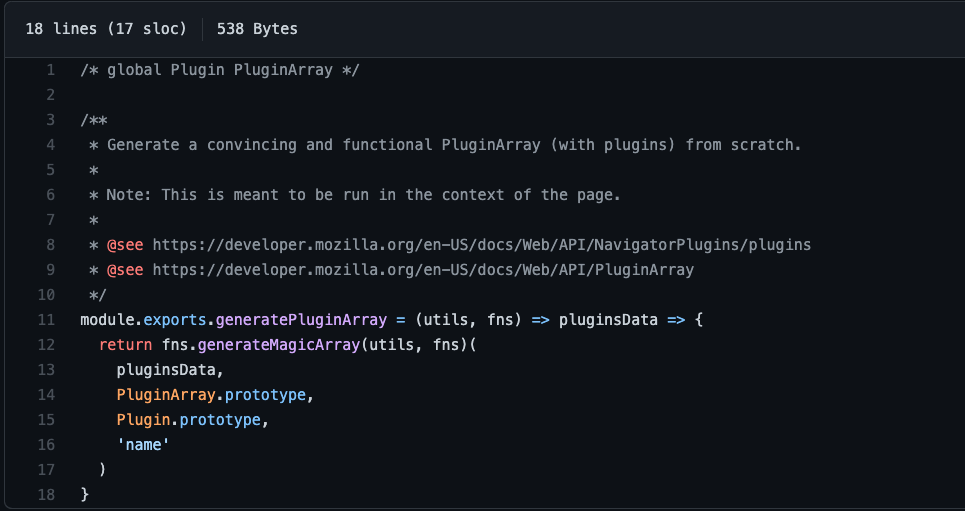
By default, this attribute is present on genuine Chrome browsers, but not on Headless Chrome browsers.
The creators of the plugin have gone to great lengths to ensure that the way they override this property looks legit by forging built-in objects in a realistic manner. They don’t just override the “navigator.plugins” property with a simple Array object. Instead, they try to make it look like the object has the proper type (PluginArray), as well as all the same properties, a genuine Chrome browser would have:
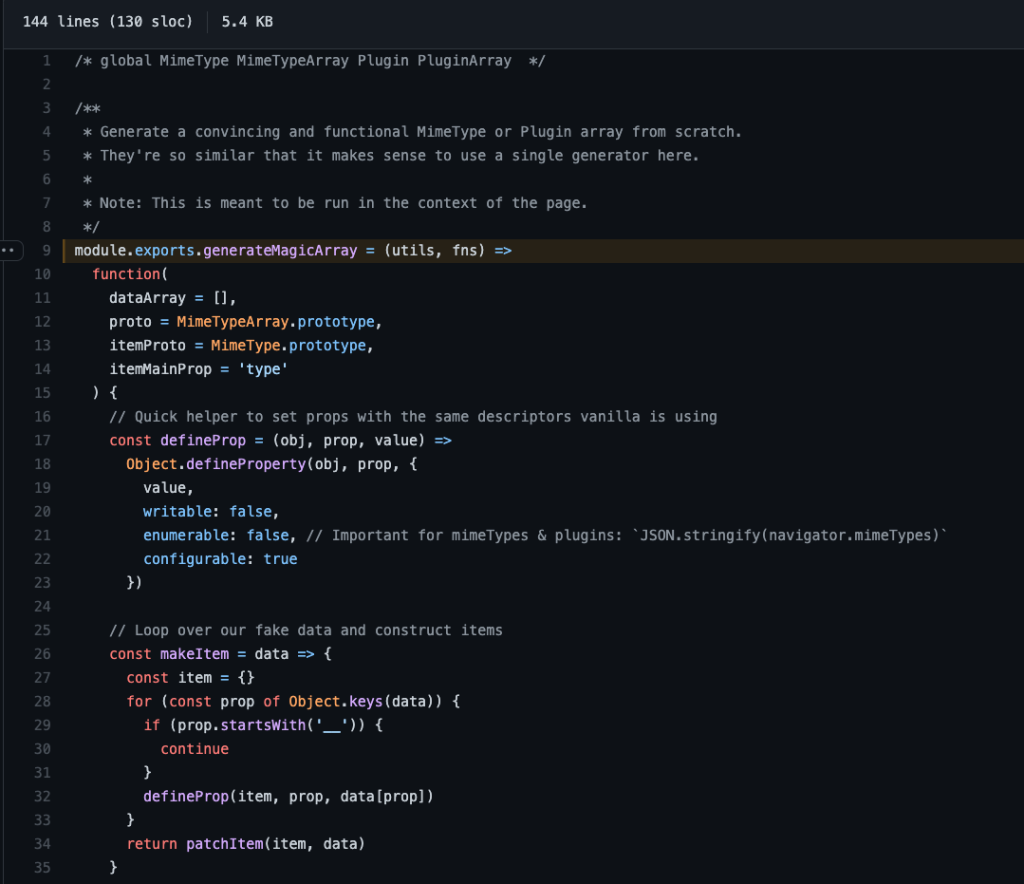
Detecting puppeteer-extra-plugin-stealth:
If the bot developer chooses a user agent that’s somewhat realistic, HTTP/TLS fingerprints are no longer useful to detect puppeteer-extra-plugin-stealth. Since the plugin is based on a headless browser, the fingerprints will be consistent.
The main techniques that are useful to detect the stealth plugin are:
- A powerful behavioral detection engine.
- Advanced IP/session reputation.
- Advanced JavaScript browser fingerprinting.
While the first two techniques enable us to detect that the browser is instrumented, they don’t help us link session activity specifically to puppeteer-extra-plugin-stealth. They “only” help us flag the request as coming from a bot.
However, by using advanced JavaScript browser fingerprinting techniques, we can still detect signatures or “side effects” caused by how puppeteer-extra-plugin-stealth overrides some built-in properties.
On the one hand, Google works to detect bots with reCAPTCHA, but on the other hand, they’ve created Headless Chrome. Google’s solution for blocking bots isn’t effective against their own technology. For now, DataDome is the only solution I’ve tested that can detect Headless Chrome.
– Guillaume Hausser, CEO of Listforge
The main benefits are that we can detect the bot at its first JavaScript execution, and that we can link the bot session specifically to puppeteer-extra-plugin-stealth. This helps improve our understanding of the plugin itself, and of the tools and bot-as-a-service offerings that use it.
Puppeteer-Extra-Plugin-ReCAPTCHA
The puppeteer-extra-plugin-stealth is used specifically to forge the browser fingerprint, but puppeteer-extra also offers other plugin functionalities. A popular one is puppeteer-extra-plugin-recaptcha, a CAPTCHA farm plugin.

As we can see on the screenshot above, users just have to provide their API key for the 2Captcha CAPTCHA farm, and the plugin enables them to pass CAPTCHAs using a simple API call:

Because DataDome accurately detects puppeteer-extra-plugin-stealth, however, we can block these bots before they get a chance to pass the CAPTCHAs, whether you’re thinking about reCAPTCHA v2 vs v3 or sticking to the basics of bot protection.
Why does detecting puppeteer-extra-plugin-stealth matter?
Puppeteer-extra-plugin-stealth is very popular among bot developers. Every week, the DataDome detection engine flags ~40 million requests directly linked to Puppeteer extra stealth.

The plugin’s popularity is also demonstrated by the number of stars of the repository (3.6K) and the number of forks (452) at the time this article was written.

Furthermore, DataDome’s threat research team has found that many of the most popular bot-as-a-service (BaaS) providers, such as Bright Data, ScrapingBee, and ScraperAPI, rely on puppeteer-extra-plugin-stealth (when users choose to execute JavaScript).
The ability to quickly and accurately detect puppeteer-extra-plugin-stealth enables us to efficiently protect our customers against attackers who are using BaaS. It also enables us to flag the residential proxies they are using as being exploited by bots, which is a useful signal used by our machine learning models to identify other bots.
Detecting the stealth plugin fingerprints, and then the linked sessions and IPs, allows DataDome to block more than 50 million malicious requests every week!

Related posts

DataDome Recognized as a Sample Vendor in the Gartner® Hype Cycle™ for Application Security, 2026
Tell me more

Key Takeaways From Our Conversation With Forrester on the State of Bot & Agent Trust Management
Tell me more

How to Block AI Bots, Crawlers, & Scrapers
Tell me more

How DataDome Stopped a CAPTCHA Farm Behind 18.8 Million Ticket Scalping Attempts
Tell me more

